
| Project #5 | CMSC 131 |
| Due: Sunday November 11th, 11:00PM | Object-Oriented Programming I |
| Type of Project: Closed | Fall 2007 |
Objective
This project will give you practice in manipulating one-dimensional arrays, and writing JUnit tests.
Overview
The finished project will be a implementation of a game called "Jumble". The game starts by choosing a random word from a dictionary. The chosen word is scrambled, by applying one or more transformations to the word. Then the scrambled word is displayed, and the user attempts to unscramble it using as many transformations as he/she needs! The game automatically ends when the original word has been recovered.
See the sample run section for pictures of a typical game. Note that there is a "hint" capability whereby the cells that are close to their correct position are colored yellow.
To see diagrams for how swap, insert, and multiple swap are supposed to work, click this link!
JavaDoc
Click here to see the JavaDoc for this project. Here you will find specifications for the class you must write (Jumble) and also for the other classes that comprise the project. Before attempting to write the Jumble class, be sure to read this document and familiarize yourself with the following classes that have been written by us:
Jumble Class
This is the class you will write, see the JavaDoc for a complete description. Important: You must follow the instructions very carefully, especially in the methods called generateScrambledPuzzle, generateRandomScrambledPuzzle, and getCurrentContentsAsCells. Any deviation from the algorithms described in the JavaDoc will cause you to fail tests! In particular, be sure that you are generating random numbers exactly as described therein!
Important notes:
JUnit Tests
You are required to write a series of JUnit tests to test out the class you are writing. 20% of your grade on this project will be determined by the thoroughness of the tests you write. (Note: To get any credit at all for your JUnit tests, your project must pass all of the tests you have written!) Put your tests into the file provided called "StudentTests.java". If the tests are not located in this file, you will not get credit for them.
Each time you write a significant method for your class, you should write a series of JUnit tests (in the StudentTests file) that check to ensure that the method is working as it should. If you come to office hours for help debugging this project, the first thing we are likely to ask you is: "Show me a JUnit test that demonstrates the problem you are having."
Note: In order to get JUnit to work, you may have to add the JUnit jar file to your build path. To do this, right-click the project folder and select "Build Path", "Add Libraries". Select "JUnit" and click "Next". Choose "JUnit 3.8.1" and click "Finish".
Interacting with the GUI
To make it easy (and more fun) to play we have provided a Graphical User Interface (GUI) that will allow you to apply transformations to the current set of characters representing the game state. To run the game using this GUI, run the main method found in the PlayJumble class. (Note: In spite of the similarity of names, Graphical User Interfaces and Java interfaces are two separate concepts.) You can develop this program without using the GUI at all.
The GUI does all the work of interacting with the user and displaying the images. It calls methods in your Jumble class to perform the actual transformations, which define the game's behavior. You implement these transformations. The relationship is shown in the figure below.
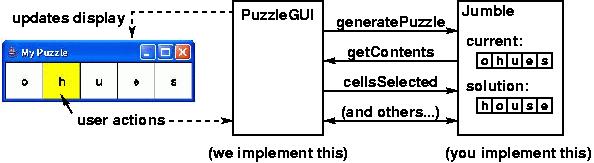
The PuzzleGUI class relies on the Jumble class to implement the game's behavior. When the user clicks on cells in the puzzle, the GUI calls the appropriate methods from the Jumble class in order to perform the required processing.
Documentation
All code you write must be well documented:
Requirements
Grading
Your grade will be computed as follows: