|
Project #4 |
CMSC 131 |
|
Due Monday, October 29th before 11:00PM |
Object-Oriented Programming I |
|
Type of project: CLOSED |
Fall 2012 |
Martian Polynomials and Unit Testing
Objective
To practice writing a complete Java class, to practice writing and calling methods of all kinds, and to practice writing JUnit tests to make sure your code is implementing the correct tasks.
Introduction
We strongly recommend that you read through this entire description before starting your implementation.
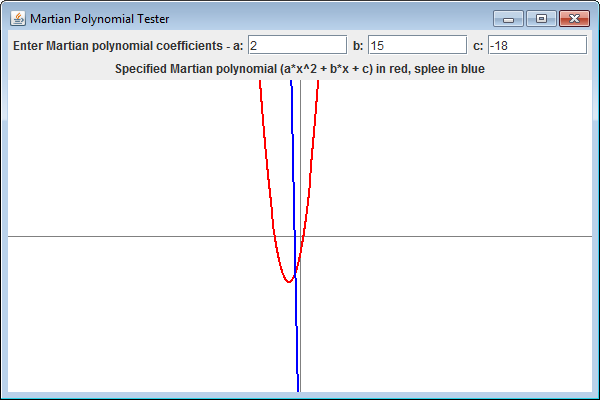
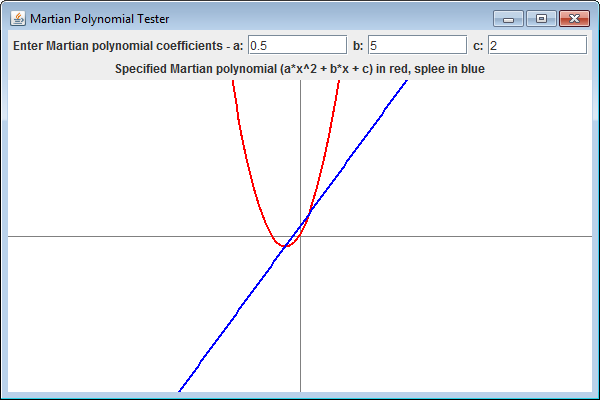
You will write a class that models a second order Martian polynomial (i.e., a trinomial) including support for basic arithmetic operations as performed on Mars. Some of these are like Human Polynomials, but others are different, so read the description carefully! The class is "immutable" meaning that once you have made an instance of the polynomial with a specific set of coefficients, it can not be changed (this makes it easier, and more efficient, to implement.) The images below show screenshots of the graphical UI showing some plots of a successfully implemented MartianPolynomial class.
Required Reading
- Your code will depend on a class that is supplied to you called MyDouble. Please review the JavaDoc for the MyDouble class API.
What you Must Implement
You will be implementing one class called MartianPolynomial, and you will be adding additional tests to a JUnit tests file. Follow the instructions below very carefully!
IMPORTANT:
- You may not make any calls to the MyDouble.toString() method, except while you are writing the MartianPolynomial.toString() method. This includes implicit calls. For example: if you have a variable, c, that refers to a MartianPolynomial, statements like the following must be removed before submitting the project: System.out.print(c);
- You must not modify any class other than the ones you are instructed to modify here.
If you do not abide by these rules, you will fail many (if not all) of the release tests!
MartianPolynomial class
You must implement all of the data members and methods described below. You may NOT add any instance variables or static variables to this class other than those described below. You may add methods of your own, as long as they are private. Not all of the methods described below are required for drawing the Martian polynomial in the simple graphical driver, but they must all be implemented correctly as part of this assignment. The class you are writing is a very general class that could be of use in a wide variety of projects.
Private Instance Variables
The class will have exactly three instance variables. These variables MUST be declared both private and final. By marking it as final your code will be allowed to assign a value to it once, which can then never be changed. The assignments to these final variables needs to be be done in the constructor(s). The MartianPolynomial class you are implementing is an immutable class.
- private final MyDouble a;
- private final MyDouble b;
- private final MyDouble c;
These variables represent the coefficients of the MartianPolynomial. That is, your class can represent any Martian polynomial of the form "a*x^2 + b*x + c" given those coefficients. For example, if an instance is supposed to represent the Martian polynomial 17.2x^2 + 3.7x - 5, then the value of a would be 17.2, the value of b would be 3.7, and the value of c would be -5. Note that you don't need to store the strings "x^2" or "x" as part of the state of MartianPolynomial since those are implicitly defined by the semantics of the class. The variables are final because once they are set in the constructors, there is no reason to ever change them. (Instance variables that are final can be initialized from within a constructor, but nowhere else.)
Public Constructors
- A constructor that takes three parameters of type MyDouble representing coefficients a, b, and c (in that order) for the MartianPolynomial being constructed. The data members a, b, and c are to be initialized with these values resulting in the polynomial: "a*x^2 + b*x + c".
- A constructor that takes two parameters of type MyDouble representing coefficients b, and c (in that order) for the MartianPolynomial being constructed. The data member a should be set to 0, and b, and c are to be initialized with the arguments resulting in the polynomial: "b*x + c".
- A constructor that takes one parameter of type MyDouble representing coefficient c for the MartianPolynomial being constructed. The data members a and b should be set to 0, and c is to be initialized with the argument resulting in the polynomial: "c".
- A constructor that takes no parameters for the Polynomial being constructed. The data members a, b, and c should be set to 0 resulting in the polynomial: "0".
- A copy constructor.
Public Instance Methods
- getA -- A simple "getter" for the value of the a data member.
- getB -- A simple "getter" for the value of the b data member.
- getC -- A simple "getter" for the value of the c data member.
- eval -- this method takes one parameter (MyDouble x), evaluates the polynomial at the point represented by the parameter and returns a MyDouble representing the result of that evaluation. (i.e., if your polynomial is 1x^2+2x+4 , and you call eval(5), it should return 39.)
- add -- this method takes one parameter (a MartianPolynomial). It will return a new MartianPolynomial that is equal to the sum of the current object and the parameter. (Do not modify the current object.)
- subtract -- this method takes one parameter (a MartianPolynomial). It will return a MartianPolynomial that is computed by subtracting the value of the parameter from the current object. (Do not modify the current object.)
- glorp -- this method takes one parameter (a MartianPolynomial). If you glorp the Martian polynomial a*x^2 + b*x + c and the Martian polynomial d*x^2 + e*x + f you end up with the new Martian polynomial of (af)x^4 + (ae + bf)x^3 + (cf + be + ad)x^2 + (ce + bd)x + cd as the result. This method will return a MartianPolynomial which is the glorp of the current object and the parameter. However, if the resulting Martian polynomial would end up having a third or fourth order term (terms of the type "x^3" or "x^4"), then the method must return null. Note that you can return null by using: "return null;" (Do not modify the current object.)
- splee -- this method takes no parameters and returns a new MartianPolynomial that is computed by taking the splee of the current object. The formula for taking the splee of a Maritan polynomial "ax^2 + bx + c" is "4acx + bc". (Do not modify the current object.)
- cliff -- this method takes no parameters and returns a new MyDouble object representing the cliff of the current object. The definition of taking the cliff of a martian polynomial is: sqrt((a+b+c)^2).
- compareTo -- this method takes one parameter (a Martian Polynomial) and returns an int. It will compare the cliffof the current object with the cliff of the parameter. If the cliffs are equal, this method returns 0; if the cliff of the current object is less than the cliff of the parameter, this method returns -1; if the cliff of the current object is greater than the cliff of the parameter, this method returns +1.
- toString -- this method takes no parameters and returns a new String representing the polynomial. The string you create must have exactly the form specified here. See examples below, which illustrate correct return values for the toString() method in each case. Note that you are allowed to use the MyDouble.toString() method for this one method. These are the requirements:
- There are never any spaces in the string.
- Do not include an "*" in the "x^2" and "x" terms. (i.e., create "23x^2", not "23*x^2").
- If there are negative terms, they should be represented by subtraction, not addition of a negative term (i.e., create "2x^2+4x-6", not "2x^2+4x+-6".
- If there are any terms with a 0 coefficient, then skip that term (i.e., create "2x^2-6", not "2x^2+0x-6"). If all 3 coefficients are 0, then the string should be "0"
- If there are any terms with a 1 coefficient, then display that coefficient (i.e., create "2x^2+1x+3", not "2x^2+x+3").
- If the decimal component of a coefficient is 0, then do not include a decimal portion for that coefficient (i.e., create "23x", not "23.0x"). Note that the MyDouble.toString() method does this for you automatically.
- Examples:
- 23.3x^2+37x+8
- -23.3x^2-37x+8
- -23.3x^2-37x+1
- -23.3x^2+1x+8
- 37x+8
- 23.3x^2+8
- 8
- 0
Public Static Methods
- parseMartianPolynomial -- this method takes one parameter (a String) and returns a new MartianPolynomial. The parameter is a String that represents a Maritan polynomial of the form similar to that generated by MartianPolynomial.toString(). You must return a new instance of a MartianPolynomial that correctly represents the string. You may assume that the String being passed to this method is correctly formatted. The strings that get passed into this method have the following properties:
- They are completely valid (i.e., there are never any errors that you need to detect)
- Entire terms may be missing, so except for the special case where the entire input is "0", you will never have a zero coefficient (i.e., you will get "2x^2+5", not "2x^2+0x+5").
- If a coefficient is 1, then the actual digit 1 will always be included. That is, the 1 coefficient will never be skipped.
- There may be any number of spaces at the beginning of the string, at the end of the string, or around the "+" and "-" characters (i.e., between terms), but never within a term. i.e., "2x^2 + 5" or "2x^2 -5" or "2x^2 - 5" are all ok. (This is the one difference between the input to parseMartianPolynomial and the output of toString(), which never has any embedded spaces.)
You will have to use some of the methods in the Java String class, so you should probably review the online documentation for the Java String class. For example, you might want to look at the replaceAll(), lastIndexOf(), charAt() and substring() methods (among others). Also, you might find it useful to use the static method Double.parseDouble() described in the online documentation for the Java Double class. You are not allowed to use the Scanner class for this method.
How to Run the Simple Graphical Driver
We have provided a class called "MartianPolynomialDriver", which contains a static main method. After you have finished writing the MartianPolynomial class described above, running this main method will display the UI depicted at the beginning of this assignment. Changing the value of any textbox will immediately create and display a Martian polynomial. Note that MartianPolynomialDriver only exercises some of the MartianPolynomial constructors, and the eval() and splee() methods. The other methods are only exercised by the JUnit tests you will need to write (see below), and the Release tests.
Note that it is possible to get started without writing all of the methods. You can start with just some of the methods (for example, the ones necessary for MartianPolynomialDriver or for the Public tests) by writing "shell methods" for all of the other ones that you later fill in. A shell method is one that has the correct "signature" (that is, return type and parameters), and if it returns something, then that "something" is of the correct type. I.e., you could write a shell method for the "add" method that looks like the following. It will compile, and thus you can run the rest of the program, but of course the add method is not actually adding two polynomials, so any Release tests that use the add method will fail.
// Shell method for "add" that compiles so other methods can be testedpublic MartianPolynomial add(MartianPolynomial martianPoly) {
return new MartianPolynomial();
}
JUnit Tests
With this project, we have included some JUnit tests as examples in the YourTests.java file. You can run these tests yourself in Eclipse by opening the file, and from the menu selecting: Run->Run As->JUnit Test.
You must write additional JUnit tests that you place in the YourTests.java file that will determine if each of the methods you implemented (as required above) are correct. A skeleton version has been provided for each of this minimum list of JUnit tests that you need to write. These test the public methods (except for "eval()" which is tested by the Public Tests), and 1 static method. These JUnit tests need to test the eleven instance methods (including the equals method written for you) and one static method. You don't need to write a test for eval(), but you do need to fully test the other methods of the MartianPolynomial class that you are writing. They should test a variety of different situations. You may add additional methods if you would like. Make sure you are testing more than one set of values for each of the methods - one test case is not usually enough to determine if it works correctly. Look for as much variety as possible in your test cases to ensure a higher level of confidence that your code works as described.
Your JUnit tests must include a comment before each method specifying what is being tested.
Requirements
- Do not create any classes of your own (beyond the required MartianPolynomial class).
- Again, we strongly recommend that you thoroughly read through the ENTIRE project description before beginning. Some of the methods that you will be writing may make calls to other methods that you are writing.
- We are grading your projects for appropriate commenting. You must have a documentation block at the beginning containing your name, your section, your TA's name, and the date. Each method should have a comment above it telling its purpose and its expectations. Other comments should be provided wherever clarification is warranted.(Using javadoc style comments for anything that would appear in the program's documentation is the best way to do comments before each method. Using non-javadoc style comments is best for the things that would not appear in the published documentation.
- You must use meaningful variable names and good indentation both in the code and in the JUnit tests.
- The JUnit tests must include a comment specifying which method is being tested, and they must accurately test the MartianPolynomial methods listed.
- You should not modify the project specifications. For example, do not add extra behavior or output.
- Just in case you know what an array is -- you may not use arrays (or any Java collections of any kind) while implementing this project.
- Your program must terminate without using anything like System.exit(). (Don't worry if you don't know what that is.)
- You may not make calls to the MyDouble.toString() method, except while you are writing the Polynomial.toString() method. This includes implicit calls; for example: if you have a variable, c, that refers to a MartianPolynomial, the following statement will cause you to fail tests: System.out.print(c);
- You may not use the Scanner class at all.
Grading
Your grade will be determined as follows:
- Public tests (9) -- 30%
- Release tests (15) -- 53%
- Your JUnit tests (8) -- 8% (manually graded after due date - with partial credit granted when only some of the methods are suffiently tested)
- Style -- 9% (manually graded after due date)