Preliminary Material
Project 1 is worth 8% of your grade.
This project (and the 3 following it) deals with a robot moving about a chess-like board and picking up points or losing points depending upon what is in the cell it lands upon. The allowable "moves" of the robot will be stored in a circular doubly linked list of Pairs. Each pair consists of the direction of the move and the number of squares (positions) moved. The iterator class used in Project 0 will be adapted for this project to work on a circular dll. "Dit" becomes random access iterator. You will be coding the set-up of the project at this time. Other parts (like the Robot) will be added in later projects.
There will also be another pair, Mpair, that stores the row and column
on the playing board. This allows you to insert and change the contents
of the cells on the board.
- move - a pair that supplies the direction, as well as the number
of squares on the board, which a robot can move. - board - like a chess board but implemented as a vector of vectors
of integers. Its coordinates are Mpairs like [1,2] (the cell in row 1 column 2). - random access iterator - a pointer-like object that
accesses the
elements in a vector. It can move both forwards and backwards. It also
allows for random access into the circular doubly linked list.
Purpose
This project implements the STL vector class as well as a circular doubly linked list. The goals of this project are to:
- Understand a circular doubly linked list.
- Review and implement the C++ string class.
- Understand the STL vector class and manipulate a vector.
- Understand and implement a random access iterator class.
- Understand and write exceptions for each class.
Academic Integrity Statement
Please note that *all* programming projects in this course (including this one) are to be done independently or with the assistance of the instructional staff of this course only.
Please review the policies outlined on the class syllabus concerning the use of class computer accounts and concerning the University's Code of Academic Integrity. The instructors of this course will review the programs submitted by students for potential violations of the Code of Academic Integrity and if it is believed that a violation has occurred it will be referred to the Office of Judicial Programs and the Student Honor Council.
Hardcoding is considered a violation of academic integrity
Style Guide
Students are expected to write "clear and legible" code. Please review the following Style Guide which specifies how students in CMSC 214 are expected to lay out their code.
http://www.cs.umd.edu/class/spring2003/cmsc214/Projects/styleguide.txt
Points may be deducted for not following the style guide.
FAQ
Answers to "frequently asked questions" will be posted via the main projects page. Prior to asking a question or submitting a project you should check the FAQ to see if any important information has been covered there. In addition to answers to FAQ's any important information pertaining to a project will be posted on it's FAQ.
E-mailing Questions
DON'T email questions. We cannot keep up with the numerous emails about a project. GO SEE A TA or an instructor during office hours. We will generally NOT respond to email questions about the project.
Project Overview
For this project you will be required, among other things, to write the code for 7 classes:
class 1: Pair
- 1st element: one of 8 possible directions: N, NE, E, SE, S, SW, W, NW
- 2nd element: an integer indicating the number of squares to be moved on the board
class 2: Node
- the building blocks of the Moves class
- its elements are Pairs
class 3: Moves
- circular, doubly linked list containing Nodes of Pairs
- is ordered on direction first and then on number of squares to be moved
- input for the list will be in "moves.dat"
Circular doubly linked list front after
inserting one node into the list:
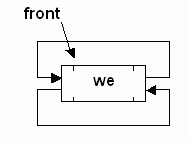
Circular doubly linked list after inserting 3
nodes:

Circular doubly linked list showing iterators:

class 4: Dit
- a random access iterator that moves about the dll. It has the capability of ++ and --, iterator math such as it+3 and allows random access of Nodes
- begin() returns an iterator pointing to the first node in the dll
- end() returns an iterator pointing to the last node in the dll unlike a real iterator; our ranges [it, it+3] will include all node between "it" and "it+3", including "it" and "it.end()"
- neither begin() nor end() are valid if the cdll is empty
class 5: Mpair
- a pair of integers indicating the coordinates of the board cell
- for coordinate [r,c], r indicates the row position and c indicaties the column position
- each row and column begins at position 0
class 6: Board
- the playing board - consists of a vector of vectors
- adapted from your text's "d_matrix.h" on page 264
- input to the board will be in "board.dat"
Board::Board(int r, int c, const
int&
init) :
rows(r), cols(c),
matrix(r,
vector<int>(c,
init))
{ }
vector<int> & Board::operator[](int
i) {
if (i < 0 || i >
rows)
throw
IndexRangeError("invalid row index, ", i);
else
return matrix[i];
}
class 7: Except
- exceptions that occur in the above classes
- 2 are provided, do not change these
- write 3 other exceptions that could occur in your classes using the same format as that of those provided
- Note: exceptions must be thrown in the function in which they occur, but they are NOT caught there. They are caught in main or in the function which calls the function containing the exception.
In the class posting accounts (~bt214001) you can find the header
files for the classes. The following rules MUST be adhered to:
- No public functions or (public, protected, or private data members) may be added to the header files.
- Your output must match our output, an example of which is provided in primary.output
- You may not change the input - as provided in "moves.dat" and "board.dat"
- Projects submitted after 2 days late will receive a grade of zero.
After copying the header files into your account you should create the corresponding Pair.cpp, Node.cpp, Moves.cpp, Mpair.cpp, Board.cpp, Except.cpp and Dit.cpp files. You will write the code that implements the member functions for these classes. Note: you may NOT change the public methods in the header files but may add private methods as needed. You may NOT add private, public or protected data members to any class other than Except.h.
You must add public methods to Except.h only


