Preliminary Material
Project 5 is worth 5% of your grade.
This project deals with implementing graphs, generating spanning trees, and using standard template library container classes, if you desire. See FAQ for more details.
For this project only, please see Chris Almazan (bt214007 at dc.umd.edu) for any problems related to the project description itself (not for debugging your program).
Purpose
This project implements a graph and generating graphs from other graphs, possibly with the help from one or more standard template library classes. The goals of this project are to:
- Understand one way you can implement a graph.
- Make sure you can create spanning trees using depth first search, breadth first search, and Prim's algorithm in code, based on lab material.
- Practice using several container classes in the standard template library.
Academic Integrity Statement
Please note that *all* programming projects in this course (including this one) are to be done independently or with the assistance of the instructional staff of this course only.
Please review the policies outlined on the class syllabus concerning the use of class computer accounts and concerning the University's Code of Academic Integrity. The instructors of this course will review the programs submitted by students for potential violations of the Code of Academic Integrity and if it is believed that a violation has occurred it will be referred to the Office of Judicial Programs and the Student Honor Council.
Hardcoding is considered a violation of academic integrity
Style Guide
Students are expected to write "clear and legible" code. Please review the following Style Guide which specifies how students in CMSC 214 are expected to lay out their code:
http://www.cs.umd.edu/class/spring2003/cmsc214/Projects/styleguide.txt
FAQ
Answers to "frequently asked questions" will be posted via the main projects page. Prior to asking a question or submitting a project you should check the FAQ to see if any important information has been covered there. In addition to answers to FAQ's any important information pertaining to a project will be posted on it's FAQ.
E-mailing Questions
DON'T email questions. We cannot keep up with the numerous emails about a project. GO SEE A TA or an instructor during office hours. We will generally NOT respond to email questions about the project.
Project Overview
This project is independent of the code from all of the previous projects. The following describes how the classes interact with each other in this project. This includes how to build a graph from scratch.
class 1: Vertex
- Each instance of the Vertex class represents each node/vertex in the graph.
- Ordering of Vertex objects are done with string comparisons on their private data members.
- This is used to implement a graph.
class 2: EndPoint
- An EndPoint represents a directed edge which only contains the cost of the edge and the vertex which the edge is pointing to.
- Ordering of EndPoint objects are done by comparing the Vertex private data members. If they are equal, then the weight of the EndPoint data members are compared.
- This is used to implement a graph.
class 3: Edge
- This represents a directed edge containing the starting vertex, the ending vertex, and the cost of traversing the edge.
- Ordering of Edge objects are done by comparing the cost of traversing the edges. If they are equal, then the starting vertices are compared. If those are equal, then just compare the ending vertices.
- This is NOT used to implement a graph, but used in helping with Prim's algorithm.
class 4: Graph
- The Graph class is where the bulk of the project work is done.
- Each graph contains a map (or hashtable): the keys are Vertex objects and the values of that key are a set of EndPoint objects. If you get the set associated with a certain Vertex, you can figure out the edges that start from that vertex. An example is listed below.
- This is an undirected graph. Please make sure that when you insert Vertex and EndPoint objects, it builds it as an undirected graph.
- Spanning trees are generated from this class as well.
- DFS and BFS traversals are done with Vertex names and not by edge weights.
- An example of how a graph is represented in memory is pictured below after inserting vertices A, B, C, and D with end points -4->C using vertex key B, -2->A using vertex key B, -5->A using vertex key D, and -3->D using vertex key C.
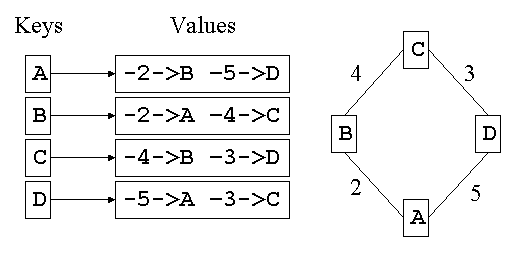
After copying the header files into your account you should create the corresponding Vertex.cpp, EndPoint.cpp, Edge.cpp, Graph.cpp files. You will write the code that implements the member functions for these classes. Note: you may NOT change the public methods in the header files but may add private methods as needed.
In each header file you will find the class with it's data member(s)
and member function(s). There is a comment before/around each member
function describing what it should do. You are to implement (i.e.
write the code for) the member function ABOVE the line
// YOU MAY IMPLEMENT OTHER PRIVATE MEMBER FUNCTIONS HERE, IF NEEDED
so that it does what the
comment states that it should do and nothing more.
Next you should write 4 unit test files to test each of your classes:
- testVertex.cpp
- testEndPoint.cpp
- testEdge.cpp
- testGraph.cpp
A unit test file should be a main() for a particular class that calls and tests each public method. It also tests the private methods which are called from public methods. Note that when developing/writing code you should do so in parts/modules and test each as you create it (keeping backup copies!). So for example, when writing Vertex, you also write a testVertex.cpp that is the main() for Vertex.cpp. It should call all public functions and include appropriate output to test that all Vertex.cpp code works correctly.
And finally you should test your project with the main provided:
main.cpp
It is expected that your output will match our primary.output exactly
Assumptions
You may assume that:
- Submitting your program only requires primary.input to match primary.output correctly. This is for students who are falling behind and need to finish up projects 3 and 4, as they are required to pass the class. This way, they can gain a few points on project 5. However, if you do not handle secondary.input and tertiary.input, you can expect to lose significant points.
- Any input we test on will generate a completely connected graph.
- You can assume the input we use will not have any noise in it.
- There will be no duplicate Vertex or EndPoint objects.
The input is done as follows (see primary.input, secondary.input, and tertiary.input for examples):
vertex [one or more each on a newline]
---
vertex endpoint_vertex endpoint_cost [one or more each on a newline]
---
{ PRINT or MST or DFS or BFS } [one or more each on a newline, indicates method to use]
---
Hints
Look over lab 9 on graphs and minimal spanning trees. This will give you a good starting point for this project.
The only real difficult part of this project is implementing the methods that generate the spanning trees. Those are in the Graph class: buildMST, buildDFS, and buildBFS. While you are not required to use any standard template library container classes, they will more than likely make your life much easier.
The map and set container classes are all ordered. So, when you use an iterator to traverse them, they will be in order according to the comparison operators you provide for the key element. This is useful when printing out anything for the Graph class.
For those people that would like hints on how to implement any of the spanning tree methods, you may find using some of the standard template library container classes useful. The following STL container classes may be useful (the numbers listed are where these classes are found in your textbook so you can find more information on them): map (610-615), set (595-596), stack (330), queue (386-387), priority_queue (413). There is information about the STL container classes in the tutorial section of the webpage. Additional help can be found at http://www.cppreference.com/.
The priority_queue class is similar to a heap. However, the default way to use the priority_queue class removes the largest element in the priority_queue. To change this so it returns the smallest element in the priority_queue, the following could be used to setup the priority_queue (this example is by string ordering):
priority_queue<string, vector<string>, greater<string> >
If you are still reading this page, you can download a series of examples from this link (upload it to your dc account).
Sample I/O
You may assume:
- There are no blank lines in the input file.
- Each line terminates with a carriage return.
- The last line contains an EOF marker.
- All of the lines will work correctly with our main program.
A primary input file and a primary output file are provided in the class posting accounts (in the appropriate directory). You should review these files. They will be named primary.input and primary.output respectively.
The graph provided can be turned into spanning trees. The following files show a graphical representation (not drawn respective to the real world) below:
- Starting Graph
- Minimum Spanning Tree
- Depth First Search Spanning Tree (Starting From Paris)
- Breadth First Search Spanning Tree (Starting From Paris)
Your project will successfully submit if it passes the primary.input.
However, if your project does not diff using secondary/tertiary.input as the input and secondary/tertiary.output as the output, your program will lose significant points.
Your program should generate the corresponding output similar to
primary.output. Additionally, we will test several methods from your
code.
When your main program is compiled and run with input redirected so that it gets the contents of the primary input file (primary.input) as input, it should generate output that matches the primary output file. When we test your program we will diff your output (using diff -bwi) with that of the primary output and if it does not match, your program will be considered to not meet the minimum running standards and you will be unable to submit it.
Passing primary does not guarantee a passing grade (70 or above) for your project. Testing your program thoroughly helps.
How to Submit
Provide a makefile that creates an executable file named p5 when the command make p5 is run.
Tar up all necessary files, such as source code, including:
- all .cpp files
- all .h files
- your makefile
submit p5.tar 5
Submit will start accepting project 5 submissions on or about 04/23/04.


