|
Project #5 |
CMSC 131 |
|
Due: Monday, April 12, 11:00PM |
Object-Oriented Programming I |
|
Type of Project: Closed |
Spring 2010 |

Objective
This project will give you practice in manipulating one-dimensional arrays, and writing JUnit tests.
Overview
The finished project will be an implementation of a game called "Jumble". The game starts by choosing a random word from a dictionary. The chosen word is scrambled, by applying one or more transformations to the word. Then the scrambled word is displayed, and the user attempts to unscramble it using as many transformations as he/she needs! The game automatically ends when the original word has been recovered.
See the sample run section for pictures of a typical game. Note that there is a "hint" capability whereby the cells that are close to their correct position are colored yellow.
Diagrams show how swap, insert, and multiple swap are supposed to work.
JavaDoc
Click here to see the JavaDoc for this project. Here you will find specifications for the class you must write (Jumble) and also for the other classes that comprise the project. Before attempting to write the Jumble class, be sure to read this document and familiarize yourself with the following classes that have been written by us:
- Dictionary
- Cell
- Random131
Jumble Class
This is the class you will write, see the JavaDoc for a complete description. You need to support words of length >= 3. You may assume that parameters to your methods have legal values (i.e., parameters to swap will be in the valid range [0, wordlen-1]. Important: You must follow the instructions very carefully, especially in the methods called generateScrambledPuzzle(), generateRandomScrambledPuzzle(), and getCurrentContentsAsCells(). Any deviation from the algorithms described in the JavaDoc will cause you to fail tests! In particular, be sure that you are generating random numbers exactly as described therein!
Important notes:
- Calling toString() on a char array will not generate a nice string representing the array, but there is a utility method that will do this. Given "char[] a", you can call Arrays.toString(a) to generate a pretty string that you can use in print statements for debugging. Or, if you use the debugger, it and click on a char array variable, it will do this for you automatically and display the contents nicely. In order to use this method, you will have import the java.util.Arrays class by putting "import java.util.Arrays;" statement near the top of your file under the package statement.
- You may use whatever instance variables you want. We recommend using one char array to represent the solution word (the original unscrambled word), and another char array to represent the current word (the current state of the puzzle).
- You may add as many methods to the Jumble class as you like, either public or private.
- You may NOT write any constructors for this class.
- You may NOT use any static variables.
JUnit Tests
You are required to write a series of JUnit tests to test the class you are writing. 20% of your grade on this project will be determined by the thoroughness of the tests you write. (Note: To get any credit at all for your JUnit tests, your project must pass all of the tests you have written!) Put your tests into the file provided called "StudentTests.java". If the tests are not located in this file, you will not get credit for them.
Each time you write a significant method for your class, you should write a series of JUnit tests (in the StudentTests.java file) that check to ensure that the method is working as it should. If you come to office hours for help debugging this project, the first thing we are likely to ask you is: "Show me a JUnit test that demonstrates the problem you are having."
Interacting with the GUI
To make it easy (and more fun) to play we have provided a Graphical User Interface (GUI) that will allow you to apply transformations to the current set of characters representing the game state. To run the game using this GUI, run the main method found in the PlayJumble class. (Note: In spite of the similarity of names, Graphical User Interfaces and Java interfaces are two separate concepts.) You can develop this program without using the GUI at all.
The GUI does all the work of interacting with the user and displaying the images. It calls methods in your Jumble class to perform the actual transformations, which define the game's behavior. You implement these transformations. The relationship is shown in the figure below.
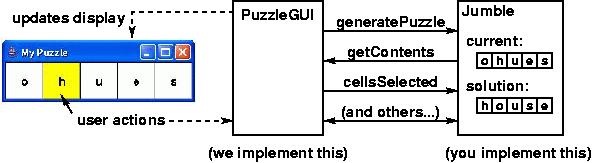
The PuzzleGUI class relies on the Jumble class to implement the game's behavior. When the user clicks on cells in the puzzle, the GUI calls the appropriate methods from the Jumble class in order to perform the required processing.
Documentation
All code you write must be well documented:
- Every class needs to have a well defined and well described purpose.
- Every data member of a class (both static and instance) needs a comment to tell its purpose.
- Every method needs to have a well defined and well described purpose which is a "contract" for that method. If someone were to call the method, this comment should tell them everything they need to know about the method, including: assumptions that the method requires in order to work properly and what the method is going to accomplish. This comment should be very detailed and include everything someone modifying the code would need to know.
- Comments that are internal to a method are necessary to
describe the purpose of parameters and local variables. Internal comments
are also needed to describe the purpose of sub-parts of that method and to
describe confusing sections of code.
Requirements
- As with all programming assignments:
- You must use meaningful variable names and good indentation. In particular, when you are naming the parameters for methods like "swap", do not use the variables names "i" and "j". Instead, use variable names like "firstIndex" and "secondIndex" or something similar.
- You must avoid code duplication, by calling appropriate methods (rather than cutting and pasting code), although you need not write your code so that multipleSwap calls swap. You may define your own private utility methods to perform often repeated tasks.
- Because we are using an automatic testing system, it is important the you adhere closely to the specifications.
- You must use Random131.getRandomInteger(), and not Java's built-in random number generator, for all random numbers.
- You may not write any constructors for the Jumble class.
- You may not use any static variables in the Jumble class.
Grading
Your grade will be computed as follows:
- Style: 10%
- JUnit tests written by you in the file StudentTests.java: 20%
- Release Tests: 35%
- Secret Tests: 35%