| Project #1 | CMSC 132 |
| Due: Friday 2/4 at 11:00 pm | Object-Oriented Programming II |
| Type of project: Open | Spring 2011 |
S N I P P E T
Introduction
When you search for a document on the web, you typically provide the search engine with a list of "terms" to look for, and the search engine responds to your query with a list of results. Each result provides a link to a document containing all of the terms in your query. Many search engines also provide a "snippet" for each result showing the search terms in the context of the document.
For example, a search for the terms: proposition seven liberty
might return the following result, which includes a "snippet" from the document showing the search terms in context:

Notice that the search terms shown in the snippet are not necessarily in the same order as they were listed in the query.
What You Will Do
You will write code that, given a document (a sequence of words) and set of search terms, will find the minimal length subsequence in the document that contains all of the search terms. If there are multiple subsequences that have the same minimal length, you may return any one of them.
For example, suppose we are searching for the terms "A", "B", and "C" in the document below:
K W D A I B D W C D W S D B F A C E S D B C D E S A D B X
There are many subsequences of this document that contain all of the search terms. For example:
A I B D W C

C D W S D B F A

B C D E S A

etc.
But, the shortest subsequence that contains all of the search terms is this one:
B F A C
There are many algorithms that will do the job. If we assume that the number of search terms is a constant, can you find an algorithm that runs in time O(n), where n is the number of words in the document? (This is not an official requirement, but if your code is way too slow then it could timeout during our testing, which will be considered a failure of the test(s) in question.)
MinimumSnippet Class
This is the class you will write. We have provided you with a skeleton of the class for you to fill in. As you will see, the constructor for the class does most of the work, including locating the mimimum snippet containing a list of terms in a given document.
For a complete description of what you must implement in this class, please see the Javadoc for the MinimumSnippet class. Read this document very thoroughly and carefully!
Iterable Interface
You'll find that one of the parameters to the constructor for MinimumSnippet is type "Iterable". This is an interface with a single method prototype. ( See the Javadoc for the Iterable interface here.) A class that implements this interface has the capability of providing you with an "Iterator" over an instance of the class. It also allows use of the for-each loop. We will talk about Iterators and for-each loops in class on Friday 1/28, and we will post a good code example to your CVS repositories that day as well. Please also see the Javadoc for the Iterator interface.
Getting Started
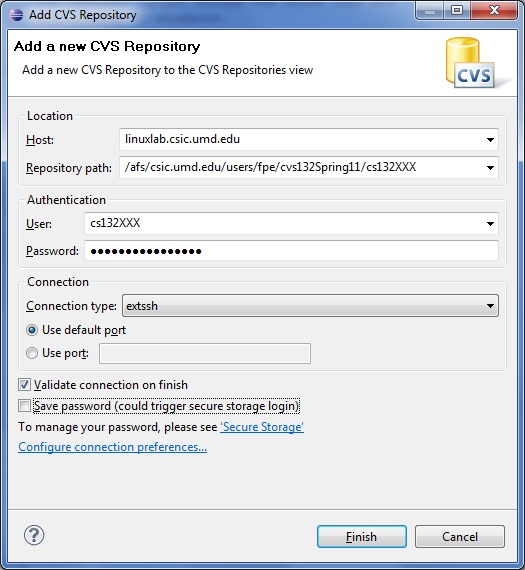
To work on a class project, the first thing you must do is to "check out" the project from your CVS repository. This was demonstrated in class, and is also described in the Eclipse Tutorial. The basic steps are:
If you write the project from scratch, without checking out the "Spring11Proj1" files from your CVS repository, you will not be able to submit your work easily.
Public Tests
We have provided several JUnit tests in the class PublicTests.java. You may run these 6 tests as often as you like on your own machine to see if your code is working properly. The results of these tests will also be used by the submit server as a portion of your grade on the project.
Submitting Your Work
Submit your project from Eclipse (within Java perspective) by right-clicking the project folder and selecting "submit" . When it asks for your ID and password, be sure to use your University of Maryland "Directory ID" and the corresponding password, and NOT your class account and password. You may submit as many times as you want -- we will always grade the submission that scores the highest on our automated testing (taking into account the late penalty for any submissions that were after the deadline, but not more than 24 hours late. The penalty for late submissions is 20%.) After you have submitted your project, you should visit the submit server. There you can obtain limited feedback about how well your project is performing. The number of times you can run our tests on your project (before the due date) is limited. The earlier you begin working on the project, the more opportunities you will have to see how your project performs on our tests before the due date!
Grading
There are 6 public tests and 11 release tests for this project. Together, these tests will comprise 90% of your grade. The remaining 10% will be "style grading", done by visual inspection. Be sure to use good variable names, proper indentation and use of braces, etc. Also be careful to avoid redundant code.