
| Homework #1 | CMSC 131 |
| Due Thursday June 10, 3:00 pm | Object-Oriented Programming I |
| Type of homework: Open | Summer 2004 |
Objective
This homework will allow you to practice variables, strings, input/output facilities, while loops, and the Eclipse IDE.
Overview
For this assignment you will write a program that allows users to change their password in a computer system. In addition, you will keep a log of how much time you are spending on various parts of the homework. The format for the log is described below.
This homework will be graded as follows:
Specifications
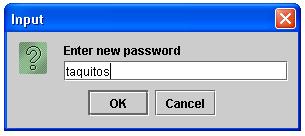
The changing password program will first read the password associated with the user. The message "Enter password" will be used when requesting the password value. For simplicity, we will assume the initial password value is the string "myhouse". The program will keep asking the user for the password value as long as the user provides an incorrect value. For each incorrect password value the program will print the message "Incorrect password, try again". After the user has provided the correct password, the program will prompt the user for a new password value using the message "Enter new password". After a new password has been provided, the program will ask the user to retype the password. If the new password value matches the retyped value the program will generate the message "Password has been changed." Otherwise the message "Password has NOT been changed" will be generated. No further processing will take place once the retyped phase has been completed.
In order to help you get started, we have defined a ChangePassword class with a main() method in a file named ChangePassword.java. In addition we have provided a time log file for you to complete. Both of these files can be retrieved by checking out the files from the CVS repository. Remember that you must have set up your repository in order to check out and submit homeworks.
Requirements
Your program must use a single class and it must use a do-while iteration statement. You must use meaningful variable names and good indentation.
Example
The following provides an sample run of the changing password program. Keep in mind this is just an example and not the only scenario the program is expected to handle..




Time Log
You must turn in a time log that you must keep during the week as you work on this class. You will not be graded on the content of this log, only by its existence. It will help us to understand how the class is going and where there are trouble spots if you fill it out accurately as you work (and not after the fact).
| Name Student ID Homework #1 Time Log Date, task, # hours -------------- For each session of work outside of class, put one entry in the log. For the task, put one of:
|
Time Log
Submission
Submit your project using the submit project option associated with Eclipse. Remember to complete your time log before submitting your project.