| Homework #2 |
CMSC 131 |
| Due Thursday June 17, 3:00 pm |
Object-Oriented Programming
I |
| Type of homework: Closed |
Summer 2004 |
Objective
This homework will allow you to practice object creation and method
invocation (for both static and non-static methods). In addition, the homework
will familiarize you with the picture infrastructure we will be using in future
projects. We want to remind you that this is a closed homework and you are
expected to complete all the work by yourself.
Overview
For this assignment you will write a program that allows
users to manipulate jpeg images. The program will read an image location
and will process the image according to the preferences specified by the
user. After processing an image, the user can either select another image
for processing or quit. In addition to the program, you must submit a time
log similar to the one associated with homework #1.
This homework will be graded as follows:
- 90% - Implementation
- 10% - Time log (only it's existence gets graded, not how much time you
spend)
Specifications
Before you read these specifications, you should check out the code
associated with this homework from the CVS repository. The code provides
all the classes associated with the picture infrastructure, along with the class
you need to implement for this program. The PictureDemo.java file
provides an example of using some of the classes that are part of the
infrastructure. The following description provides more information about
each of the classes you will find in the code distribution.
- Picture - Defines
methods every class considered a picture must implement. You can
ignore this class for this homework.
- Image - This class allow us to convert a jpeg
file into a picture object we can manipulate in our programs. We can
convert a jpeg image into a picture object by creating an Image object.
When we create an Image object we need to provide a reference to a String
object that represents the location of the image. See the
PictureDemo.java for an example.
- PictureUtil - It is an utility class
providing methods for the manipulation of pictures. The method you will use
from this class is the static method named "show" which allow us
to display a picture. Any of the picture objects you will use for this
homework can be displayed by using this method. See the
PictureDemo.java for an example.
- DoubleSize - This class enable us to double the
size of a picture. When we create a DoubleSize object we need to provide a
picture object reference as a parameter value. The DoubleSize object
created represents the picture that will result by doubling the size of the
source picture. See the PictureDemo.java for an example.
- FlipLeftRight - This class enable us to flip
a picture on the y-axis. When we create a FlipLeftRight object we need
to provide a picture object reference as a parameter value. The
FlipLeftRight object created represents the picture that will be generated
by flipping the source picture.
- Posterize - This class creates a picture
object that "posterizes" an input picture. Posterized
pictures are limited to just a few values for each of the following
colors: red, green, and blue. When we create a Posterize object
we need to provide a picture object reference as a parameter value.
- ImageProcessor - This is the class you are expected to implement. We have already
provided the class definition and a main() method you are expected to
complete. The processing associated with main is the following:
- Read the location of the jpeg image the user wants to process.
This jpeg file represents the source picture.
- Display the source picture using PictureUtil.
- The user has three processing alternatives: doubling, flipping, and
posterizing the source picture. For each alternative, your program
will ask the user whether that processing is to be performed on the
source picture. If that is the case, the particular processing will
take place and the resulting picture will be displayed. There is a
cost associated with each processing. Doubling a picture costs
$1.50, flipping costs $2.00, and posterizing has a cost of $3.00.
Your program must keep track of the total cost associated with the
processing of images.
- After processing a jpeg image your program should ask the user whether
another image will be processed. If that is the case, the steps
described earlier will take place. This process will continue
until the user decides to stop processing jpeg images. Once the
user decides to stop processing images, your program must print the
total processing cost associated with processing all the images.
We want to clarify that your program will only print the cost
information after the user decides to process no further images.
The Example section provides a sample run of the program you are expected to
write. Use the example in order to define the format to follow for input
and output dialog boxes.
In the code distribution you will also find two images (kittens-1.jpg and
kittens-2.jpg). We have provided these images in case you want to use them
during the development phase of your homework.
Requirements
You must use meaningful variable names and good indentation.
Example
The following provides an sample run of the program you need to
implement. Keep
in mind this is just an example and not the only scenario the program is
expected to handle. We have chosen to perform all the possible
manipulations (doubling, flipping and posterizing) for the input image provided;
in the example we have processed only one image. Each of the following
snapshots is preceded by a description of the processing that took
place.
Image to process has been specified

After pressing OK

After selecting YES
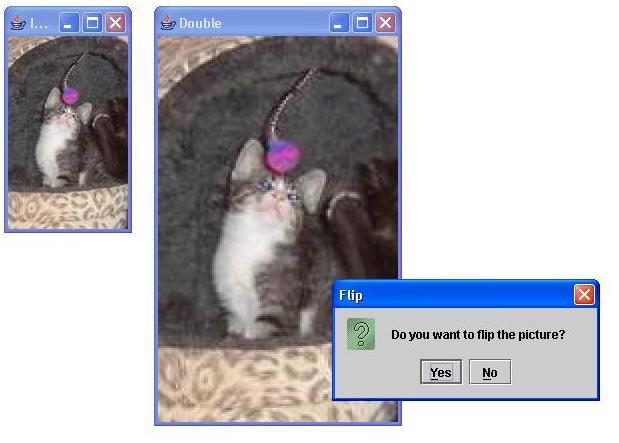
After selecting YES

After selecting YES

After selecting NO

Submission
Submit your project using the submit project option associated with
Eclipse. Remember to complete your time log before submitting your
homework. You must submit all the classes associated with your homework,
including the supporting classes (e.g., Posterize) representing the picture
infrastructure.
Web Accessibility