


The definitions below will use the following standard BNF definitions. In addition, the echoing rule at the beginning of command spec 1 still holds;)
          <docklist>:=<dock><nl><docklist>|<dock><nl>
          <dock>:= <dockname> at (<int>,<int>,<int>) of type <docktype>
          <docktype>:=REMOTE | STANDARD
          <flight> := <dockname> <dockname>
          <DNE>:= Error: Dock <dockname> does not exist.<nl>
When printing a flight, the first dockname must always be alphabetically less
than the second. In addition, whenever a <double> appears, it means a floating
point decimal number printed with exactly three digits after the decimal place
(including trailing zeros as necessary).
Also, when looking at the list of errors, eg.
<error>:= <DNE>|<NR>|<AI>|<DC>|<NZ>
the leftmost applicable error should always be the one printed. If multiple dock arguements cause the same error, then the dock given first should be the one for which an error is printed.
Note that the following rules apply to B+ tree nodes:
Internal: must always contain between floor(
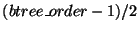 )
and
)
and
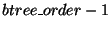 keys, with exactly one more child than the number of keys
at all times. (this implies between ceiling(
keys, with exactly one more child than the number of keys
at all times. (this implies between ceiling(
 )
and
)
and  children per node, inclusive).
Leaf: must always contain between ceiling(
)
and
keys, inclusive. Must not contain keys!
Remember the root is an exception, in that it never has a lower bound on the number of keys it contains.
Also, whenever a value is equal to a key it must go to that key's RIGHT child. This is mandatory, meaning no credit will be given for the B+ tree if this rule is not observed.
Even if you do not implement the b+ tree you must still implement this function!
Default to printing the correct <success> message. Because this is always
the first command and diff is used in grading, if you skip this function your
project will fail every test!
          Output summary:
          <output>:=<success>|<error>

          <success>:= Order set to <btree_order>.<nl>
          <error>:=Error: B+ tree already initialized.<nl>
          Output summary:
          <output>:=<success>

          <success>:=All structures cleared.<nl>
 ) and assigns name dock_name to
it. Names will be limited to 10 characters in length and will be
alphanumeric or '_';
) and assigns name dock_name to
it. Names will be limited to 10 characters in length and will be
alphanumeric or '_';  and
and  coordinates will be in range [0, 1024]. The
  coordinate will be in the range [0,max_32bit_signed_int]. Note that the boundaries are closed for the
PM1(although CREATE_DOCK does not interact with any structures besides the B+ tree).
You should
store the dock internally in an asciibetically ordered B+ tree. Dock names are
case sensitive. You should not check for coordinate conflict with an existing
dock in this function, however you will in the CREATE_FLIGHT function.
coordinate will be in the range [0,max_32bit_signed_int]. Note that the boundaries are closed for the
PM1(although CREATE_DOCK does not interact with any structures besides the B+ tree).
You should
store the dock internally in an asciibetically ordered B+ tree. Dock names are
case sensitive. You should not check for coordinate conflict with an existing
dock in this function, however you will in the CREATE_FLIGHT function.
For project 3 docks may have a specific type dependant on the first letter of their name (case insenstative). So far these will include only Remote Docks (which will begin with the letter 'R' or 'r') and Standard Docks (those beginning with any other valid character). Remote Docks will have the special property that flights cannot be created to them or between them.
          Output summary:
          <output>:=<success>|<error>
          <success>:=Created Dock <dock>.<nl>

          <error>:=<BAD_COORD>|<AE>
          <AE>:=Error: Dock <dockname> already exists.<nl>
          <BAD_COORD>:= Error: Coordinates out of range.<nl>
My putting this statement here does not mean that this wasn't a requirement for P2, but to make this clear B+ delete must run in O(logn) time. (As must insert)
          Output summary:
          <output>:=<success>|<error>

          <success>:=Deleted dock <dockname>.
          <error>:=<DNE>|<AI>
          <AI>:= Error: Dock <dockname> has already been inserted.<nl>
          Output summary:
          <output>:=<success>|<error>

          <success>:=<docklist>
          <error>:= <BT>|<NM>
          <BT>:= Error: The specified type is invalid.
          <NM>:= No matching docks found.<nl>
          D1: D2(1.000) D3(1.000)
          D2: D1(1.000)
          D3: D1(1.000)
          Output summary:
          <output>:=<success>|<error>

          <success>:= <adj-list>
          <adj-list>:=<adj-row><adj-list>|<adj-row>
          <adj-row>:=<dockname>:  <adjEdges><nl>
          <adjEdges>:= <adjEdge>(<double>) <adjEdges> | <adjEdge>(<double>)
          <adjEdge>:= <dockname>
          <error>:= No flights have been approved.<nl>
          {(bar)}
          {(DOCK3),(foo)}
          {(DOCK1,DOCK2),(DOCK3),(bar),(foo)}
Note the leaf DOCK3 is to the RIGHT of the key DOCK3:)
Even at the leaves print only the key (the dockname). If the tree is empty, print "Tree is empty." Your tree is not expected to match mine exactly. Your grade will be based on your tree displaying the properties described above in the SET_BPTREE_ORDER command.
For our order m tree: The leaves contain between 1 and m-1 keys. They may not have m keys. Internal node internal nodes must have between ceiling(m/2) and m children. There must be one fewer guides than children (no 'extra' key on the far left should be printed, even if you used one in your implementation). Your tree, of course, must also contain the correct data at the leaves!
          Output summary:
          <output>:=<success>|<error>

          <success>:=<b+rows><nl>
          <b+rows>:=<b+row><nl><b+rows>|<b+row>
          <b+row>:={<nodes>}
          <nodes>:=<node>,<nodes>|<node>
          <node>:=(<keys>)
          <keys>:=<key>,<keys>|<key>
          <key>:=<dockname>

          <error>:= Tree is empty.<nl>
If you reach a leaf with a dock in it you do not need to worry about printing the list of flights associated with that leaf.
Our outputs should be identical regardless of implementation. A tree with one element should make the root appear to be a leaf- ie. Only the REMOTE dock would be printed out. (The only way a the root can be a leaf is is a REMOTE dock is added to an empty tree).
It's up there at the top, but remember that the docks in a fligth must be printed in increasing alphabetical order.
          Output summary:
          <output>:=<success>|<error>

          <success>:= <pmtree><nl>
          <pmtree>:=<black_node><nl>|<white_node><nl>|<nl><grey_node>
          <grey_node>:= NW <pmtree> NE <pmtree> SW <pmtree> SE <pmtree>
          <black_node>:=<dock><nl>| <flight><nl>
          <white_node>:=

          <error>:= Tree is empty.<nl>
          Output summary:
          <output>:=<success>|<error>

          <success>:=<docklist>
          <error>:= No matching docks found.<nl>
          Output summary:
          <output>:=<success>|<error>

          <success>:= <dockname1> -> <moredocks> <nl>Total length:<double>.<nl>
          <moredocks>:= <dockname> -> <moredocks>| <dockname2>
          <error>:= <DNE>|<NF>|<NP>
          <NF>:= Error: Dock <dockname> has not been added to the map.
          <NP>:= Error: No path exists.
          Output summary:
          <output>:=<success>|<error>

          <success>:= Dock <dockname> has been inserted.<nl>

          <error>:= <NR>|<DNE>|<AI>|<DC>
          <NR>:= Error: Dock <dockname> is not a REMOTE dock.<nl>
          <AI>:= Error: REMOTE dock <dockname> has already been inserted.<nl>
          <DC>:= Error: Dock <other_dockname> already exists at the specified coordinates.
          Output summary:
          <output>:=<success>|<error>

          <success>:= Dock removed.<nl>

          <error>:= <NR>|<DNE>|<NAI>|<DC>
          <NR>:=  Error: Dock <dockname> is not a REMOTE dock.<nl>
          <NAI>:= Error: Dock has not yet been inserted.<nl>
If an attempt is made to create a flight between a dock and itself, (ie. dockname1==dockname2) report an error.
Right now there is no support for intersecting edges in the PM1, so if the flight intersects an existing flight print an error. In this case the PM1 should not be modified. The error should include the flight that is intersected. If multiple flights are intersected you may chose one arbitrarily. For simplicity the TA will not add a flight which intersects a REMOTE point, but you should still handle this gracefully for your own peace of mind. Note that if an endpoint of the flight is at the same coordinates a different dock which is already in the PM1, then this will be handled as an intersection error.
          Output summary:
          <output>:=<success>|<error>

          <success>:= Flight approved.<nl>

          <error>:= <DS>|<RD>|<DNE>|<LD>|<ID>|<AA>
          <DS>:= Error: Docknames must be distinct.<nl>
          <RD>:= Error: Flights cannot be created to REMOTE docks.<nl>
          <LD>:= Error: Docks must have the same z coordinate.
          <ID>:= Error: Intersection detected with flight: <flight>.
          <AA>:= The specified flight has already been approved.<nl>
Note that the flight is the flight intersected, and follows the same alphabetical ordering rules as flights everywhere else.
          Output summary:
          <output>:=<success>|<error>

          <success>:= Flight deleted.<nl>

          <error>:= <DNE>|<NFE>
          <NFE>:= Error: The specified flight does not exist.<nl>
          Output summary:
          <output>:=<success>|<error>

          <success>:= Nearest flight: <flight>. Distance: <double>.<nl>
          <error>:= Error: No flights exist on this level.
          Output summary:
          <output>:=<success>|<error>

          <success>:= Nearest dock: <dockname>. Distance: <double>.<nl>
          <error>:= <NF>|<NRE>
          <NF>:= Error: The specified flight does not exist.
          <NRE>:= Error: No REMOTE docks exist on this level.
              3
              5
              7

          Output summary:
          <output>:=<success>|<error>

          <success>:=<skipnodes>
          <skipnodes>:=<skipnode><nl><skipnodes>|<skipnode><nl>
          <skipnode>:= <int>

          <error>:= Skiplist is empty.<nl>
1. If you are using java you can use the canvas class on the web page (or any other java drawing utils that you prefer, but I hear that the canvas class is quite nice). If you choose this method you can ignore the outfile parameter.
2. If you are using c++ (or java with a few modifications)
you can make use of the printquad/showquad
also on the web page. Also quite easy to use. My recommendation is to
the psdraw.h file I provided to output drawing commands to a file. When
grading I will then manually run printquad program to produce a postscript
file.  should be the name of the file you produce. If you wish to
produce a postscript file directly, its name should be '.ps'. Like
the java project, if you can display the image directly to an x-term window
using the showquad package or any other means you may do so.
should be the name of the file you produce. If you wish to
produce a postscript file directly, its name should be '.ps'. Like
the java project, if you can display the image directly to an x-term window
using the showquad package or any other means you may do so.
Please use common sense in rendering your picture to a size that fits on an average size screen(1024x768 max). It is understood the small quadrants will be difficult to see in the picture, this is ok. We will just be eyeballing pictures, as long as your output looks correct we will be happy.
DRAW_MAP() is primarily for *you*. As stated, drawing is very easy to do, The goal is that by forcing you to draw your output you will have an easier time debugging, especially later projects.
          Output summary:
          <output>:=<success>
          <success>:= Drawing complete.<nl>