


You will build a command decoder with a small set of commands; you will expand it later to accommodate commands required for future parts. Each command spans exactly one line; commands will be uppercase, and reasonably sloppy syntax is to be supported (spaces and empty lines are allowed).
The following is a list of commands you should support for part 1 and a description of
the output you should give for each one. Note that for all functions, you should
print "*****\n" followed by a " ==> " and an echo of the command given.
For instance, the entire valid output to CLEAR_ALL() is
*****
 ==> CLEAR_ALL()
All structures are cleared.
The sample output should make this clear. This is done to negate the effects of input redirection and to assist in grading. Note that although it is done in the samples that will appear later, you are not required to reformat the original command (fixing spacing, for instance) in any way.
The order will never be less than 3(here or for any future parts- this covers internal node size only, in part 3 or 4 you will have to allow for an independant leaf size, which may be as small as 1) . You should check for this condition to avoid crashing horribly on a bad input, but I won't add a specific error for this part.
Note that the following rules apply to B+ tree nodes:
Internal: must always contain between floor(
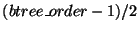 )
and
)
and
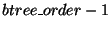 keys, with exactly one more child than the number of keys
at all times. (this implies between ceiling(
keys, with exactly one more child than the number of keys
at all times. (this implies between ceiling(
 )
and
)
and  children per node, inclusive).
Leaf: must always contain between ceiling(
)
and
keys, inclusive. Must not contain keys!
Remember the root is an exception, in that it never has a lower bound on the number of keys it contains.
Also, whenever a value is equal to a key it must go to that key's RIGHT child. This is mandatory, meaning no credit will be given for the B+ tree if this rule is not observed.
Even if you do not implement the b+ tree you must still implement this function!
Default to printing the correct <success> message. Because this is always
the first command and diff is used in grading, if you skip this function your
project will fail every test!
          Output summary:
          <output>:=<success>|<error>

          <success>:= Order set to <btree_order>.<nl>
          <error>:=Error: B+ tree already initialized.<nl>
          Output summary:
          <output>:=<success>

          <success>:=All structures cleared.<nl>
 ) and assigns name dock_name to
it. Names will be limited to 10 characters in length and will be
alphanumeric or `_';
) and assigns name dock_name to
it. Names will be limited to 10 characters in length and will be
alphanumeric or `_';  and
and  coordinates will be in range [0, 1024). The
  coordinate will be in the range [0,64). You should
store the dock internally in an asciibetically ordered B+ tree. Dock names are
case sensitive. You should not check for coordinate conflict with an existing
dock in this function, however you will in the INSERT_DOCK function.
coordinate will be in the range [0,64). You should
store the dock internally in an asciibetically ordered B+ tree. Dock names are
case sensitive. You should not check for coordinate conflict with an existing
dock in this function, however you will in the INSERT_DOCK function.
          Output summary:
          <output>:=<success>|<error>
          <success>:=Created Dock <dock>.<nl>

          <dock>:= <dockname> at (<int>,<int>,<int>)

          <error>:=<nameErr>
          <nameErr>:=Error: Dock <dockname> already exists.<nl>
          Output summary:
          <output>:=<success>|<error>
          <success>:=Dock <dockname> has been inserted.<nl>

          <error>:=<NE>|<AI>
          <NE>:=Error: Dock <dockname> does not exist.
          <AI>:=Error: Dock <dockname> has already been inserted.
          Output summary:
          <output>:=<success>|<error>

          <success>:= Flight approved.<nl>

          <error>:= <NE>|<AE>|<NI>
          <NE>:= Error: Dock <whichdock> does not exist.<nl>
          <NI>:= Error: Dock <whichdock> has not been inserted.<nl>
          <whichdock>:= <dock_name1> | <dock_name2>
          <AE>:= The specified flight has already been approved.<nl>
A note on <NE> and <NI>- the first dock that
fails(based on the order the docks are
given to the function) should be the one printed. The <NE> error should
supercede the <NI> error. At most one error should ever be printed.
          Output summary:
          <output>:=<success>|<error>

          <success>:=<docklist>
          <docklist>:=<dock><nl><docklist>|<dock><nl>
          <dock>:= <dockname> at (<int>,<int>,<int>)

          <error>:= Dictionary is empty.<nl>
          D1: D2(1.000) D3(1.000)
          D2: D1(1.000)
          D3: D1(1.000)
          Output summary:
          <output>:=<success>|<error>

          <success>:= <adj-list>
          <adj-list>:=<adj-row><adj-list>|<adj-row>
          <adj-row>:=<dockname>:  <adjEdges><nl>
          <adjEdges>:= <adjEdge>(<double>) <adjEdges> | <adjEdge>(<double>)
          <adjEdge>:= <dockname>
          <error>:= No flights have been approved.<nl>
          Output summary:
          <output>:=<success>|<error>

          <success>:=<docklist>
          <docklist>:=<dock><nl><docklist>|<dock><nl>
          <dock>:= <dockname> at (<int>,<int>,<int>)

          <error>:= No docks found within the specified region.<nl>
          Output summary:
          <output>:=<success>|<error>

          <success>:=<docklist>
          <docklist>:=<dock><nl><docklist>|<dock><nl>
          <dock>:= <dockname> at (<int>,<int>,<int>)

          <error>:= Tree is empty.<nl>
          {(bar)}
          {(DOCK3),(foo)}
          {(DOCK1,DOCK2),(DOCK3),(bar),(foo)}
Note the leaf DOCK3 is to the RIGHT of the key DOCK3:)
Even at the leaves print only the key (the dockname). If the tree is empty, print "Tree is empty." Your tree is not expected to match mine exactly. Your grade will be based on your tree displaying the properties described above in the SET_BPTREE_ORDER command.
For our order m tree: The leaves contain between 1 and m-1 keys. They may not have m keys. Internal node internal nodes must have between ceiling(m/2) and m children. There must be one fewer guides than children (no 'extra' key on the far left should be printed, even if you used one in your implementation). Your tree, of course, must also contain the correct data at the leaves!
          Output summary:
          <output>:=<success>|<error>

          <success>:=<b+rows><nl>
          <b+rows>:=<b+row><nl><b+rows>|<b+row>
          <b+row>:={<nodes>}
          <nodes>:=<node>,<nodes>|<node>
          <node>:=(<keys>)
          <keys>:=<key>,<keys>|<key>
          <key>:=<dockname>

          <error>:= Tree is empty.<nl>