| Project #2 | CMSC 131 |
| Due Tuesday 9/27/05, 11:00 pm | Object-Oriented Programming I |
| Type of project: Closed | Fall 2005 |
Objective
This project will give you practice using class libraries, and will also help you practice your skills with basic Java programming (variables, loops, and conditional statements, etc.)
One of the other goals of the project is to help you get used to reading "JavaDoc". JavaDoc is a tool that Java programmers use to create automatically-generated documentation for their projects. This sort of documentation has been generated for all of the standard Java class Libraries. If you haven't already discovered it, take a look: Java 5.0 API Specifications
JavaDoc
We have created JavaDoc for the all of the class files that are part of this project. Take a look: Project 2 JavaDoc. There will be a lot of information in the JavaDoc that you won't be able to understand yet. Please don't worry about that -- by the end of the course it will all make sense! Just look for the specific instructions that I have placed there showing you what syntax to use.
The class you will be writing will make heavy use of a library called "cmsc131PictureLibrary". You should read and familiarize yourself with the JavaDoc for all of the classes in this Library. Also take a look at the JavaDoc for the class called ProcessingCosts, which is found in the PhotoLab package. You'll need to use that stuff too.
Overview
This project consists of many files working together. You will be responsible for writing a class called "ImageProcessor". The rest of the project has been written for you, so DO NOT MODIFY ANYTHING ELSE!
You will write a simulation of a photo processing lab. We have provided several images for you to test your program with. They are:
You may also use images of your own, or even enter URL's from images on the web when the program asks for image location(s).
Below is a list of the tasks your photo lab can perform:
Tasks that can be done with ONE image:
Tasks that can be done with TWO images:
Each task has a cost associated with it. Your program will keep track of these costs and display them, as described later.
At this point, you might want to scroll down and take a look at the section titled "Sample Run" to get an idea of how the program will look while it is running.
This project is considered "closed". Please visit the course web page for information regarding the open/closed policy for projects of this course.
Specifications
You are writing the main() method for the class called "ImageProcessor", which is part of the PhotoLab package.
There is another class in the PhotoLab package called ProcessingCosts. This class has been written for you, so please don't make any modifications to it! The ProcessingCosts class contains pricing information for your lab's services. When you need to calculate how much to charge the customers, you should rely on the values of the fields in this class.
Your program should begin by printing:
Welcome to the Photo Lab.
After that, it should display the current costs for the various tasks that the lab can perform. Hint: There is a method in the ProcessingCosts class that you should use to display this information. Read the JavaDoc to see how!
Your program will now begin processing jobs. The first job is "job number 1", next is "job number 2", etc. Each job will either involve processing either one image or two images. The user will specify which image(s) he/she would like to process and which tasks he/she would like you to perform on these image(s). Your program will keep track of the total cost for the current job. It will also keep track of the total cost for all of the jobs combined.
Processing Jobs
Begin by printing:
JOB NUMBER X
where X is the job number (1, 2, 3, etc.) Next prompt the user to specify the number of images to process:
How many images do you want to process? (1/2)
Processing ONE image:
If the user specifies that he/she only wants to process a single image, follow these instructions:
Enter image to process:
Do you want to generate a black and white picture? (y/n)
Do you want to rotate it? (y/n)
Processing TWO images:
If the user specifies that he/she wants to process two images, follow these instructions.
Enter first image to process:
Enter second image to process:
Do you want to stack up the pictures? (y/n)
Do you want to place pictures side by side? (y/n)
Do you want to merge them? (y/n)
Finishing the Job:
After processing the images, as described above, you should display the total cost for the job using correct formatting for money. Hint: You can see an example of how to format money correctly by looking at the source-code for the ProcessingCosts class.
Cost for job X: $xx.xx
Here the X is the job number (1, 2, etc.) and the $xx.xx represents the total cost for this job in dollars and cents.
Now ask if they want to process more job(s):
Do you want to process another job? (y/n)
Regardless of their answer, the next thing you must do is to clear all of the images from the screen. Hint: There is a method in the PictureUtil class that will do this for you. Read the JavaDoc! Important: This is the only place in the program where you should clear the screen. If you clear the screen at any other point in the program's execution you will fail one or more release tests.
If they answer yes about processing another job, then process another job (follow instructions above again (starting by printing the JOB NUMBER X line.))
If they answer no, then end the program by printing:
X jobs completed.
Total Cost: $xx.xx
Here X represents the total number of jobs completed, and $xx.xx represents the total cost of all of the jobs combined. Hint: We are expecting you to use proper grammar. Note the difference between printing: "1 job completed." and "2 jobs completed."
Requirements
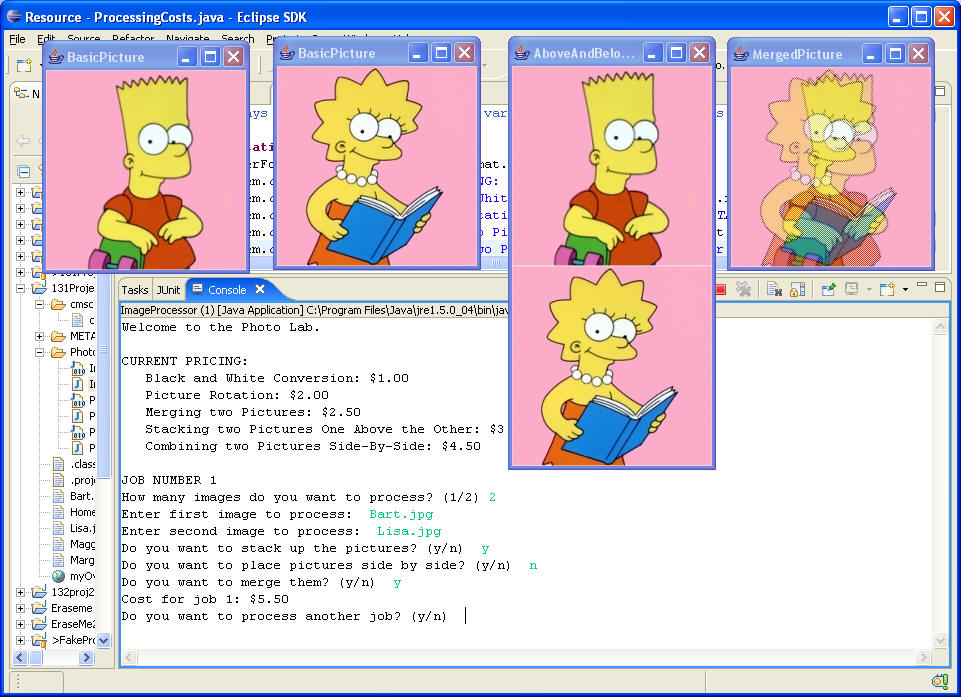
Below is a screenshot of a typical run of the program from within Eclipse. This screenshot was captured just before the user answered the question about whether or not he/she wants to process another job. (Just after that question is answered, all of the pictures would be erased.)
Challenge Problem
Remember that you are not required to implement the following problem.
IMPORTANT: If you decide to complete the challenge problem you must provide its implementation in a separate file called Challenge.java. In other words, use ImageProcessor.java for the standard program and use Challenge.java for the challenge problem. One way to do this is to first finish the standard implementation in ImageProcessor.java (and test it), and then copy and paste its contents into Challenge.java. Then continue with the implementation of the challenge problem.
The challenge problem for this homework consists of adding a feature to your program which allows us to "concatenate" (put side by side) several images (three or more) present in a location. The side-by-side operation is the only one allowed if the user specifies 3 or more images. If the user specifies 1 or 2 images, the program behaves exactly as it does for the standard implementation.
The standard implementation is modified as follows. If in response to the prompt "Input number of images to process", the user inputs a number of 3 or more, your program will then prompt the user to "Enter the common base name". The name of each file will consist of the base name followed by a digit (1-9) followed by ".jpg". For example, if the user requests that 4 images be processed, and enters the base name "shrek-", the following four files will be combined side by side:
shrek-1.jpg shrek-2.jpg shrek-3.jpg shrek-4.jpg
You may assume that no more than 9 images will be combined. If k images are processed in this way, the total cost is increased by (k-1) times the side-by-side cost (ProcessingCost.SIDEBYSIDE).
For testing purposes, you can use the following base name (which is a web address) and combine up to 4 images. (Since the name is long, it is a good idea to copy and paste it in while running the program.)
http://www.cs.umd.edu/class/fall2005/cmsc131/CourseImages/shrek-