| Project #3 |
CMSC 131 |
| Due Friday 10/7/05 at 11:00 PM |
Object-Oriented Programming I |
| Type of project: Open |
Fall 2005 |
Objective
To practice writing and calling methods, and to reinforce all of the
techniques we've been learning so far.
Overview
This project is an extension of the last one, but with upgraded
functionality.
Input/Output with Dialog Boxes
Instead of using the console for input and output, this project will use very
simple dialog boxes to interact with the user. To facilitate this, we have
added an additional class to the cmsc131PictureLibrary. The new class is
called TextInputOutput. There is a method in this class with the following
signature:
public static String simpleDialogBox(String out)
The parameter "out" is a prompt that will be
displayed for the user; the return value is the user's response to the prompt.
For example, here is the result of what would happen if you called the method
passing in the String "Enter your name:" as the value of the parameter
"out":
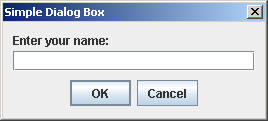
The return value from the method would be whatever String the user typed into
the box. Try it and see how it works before proceeding with the rest of
the project!
What is Provided and What You Must Write
We are providing a Driver in a class called "Driver.java". We are also
providing the same things in the cmsc131PictureLibrary that were provided in the
last project. You may want to look over the JavaDoc for the
cmsc131PictureLibrary again (see Project #2). You will be filling in
the implementation of a class called PicViewer, which will provide numerous
static methods. Your methods will make calls to methods from the
cmsc131PictureLibrary. Our Driver will make calls to the methods that
you have written.
The first thing our driver will do is ask the user for a password. The
driver will do this by calling a method that you have written (described later).
If the user provides an appropriate password, then the driver repeatedly
displays a menu that the user will use to select various options for Image
Processing. Below is what the menu looks like:
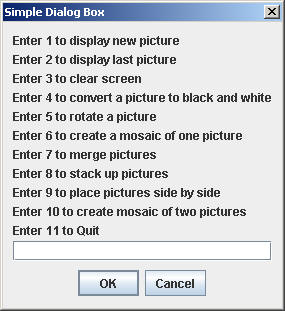
The driver will then handle the user's choice mostly by making calls to
methods that you have written (described below.)
PicViewer Class
This is where YOU come in. You must fill in the implementation for the
PicViewer class (lots of static methods.)
IMPORTANT: Whenever you need to interact with the user, your
prompt (and the user's response) should be handled using the simpleDialogBox
method described above! DO NOT USE system.out.print for output, and DO NOT
USE the Scanner class for input!
Below is a description of all of the static methods that you must implement:
- public static boolean readPassword(String passwordOne, String
passwordTwo, int maxAttempts) -- The parameters "passwordOne" and "passwordTwo"
represent the two valid passwords that the user could enter. The value
"maxAttempts" represents the maximum number of attempts the user is allowed
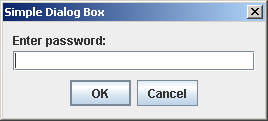
to make at entering one of the two passwords. This method will prompt
the user with the String "Enter password:". If the user enters the
wrong thing, repeat this prompt up to "maxAttempts" number of times.
If the user enters wrong things "maxAttempts" number of times in a row,
return false. If the user enters either of the correct passwords
within "maxAttempts" number of tries, return true. Your prompt should
look like the one below:
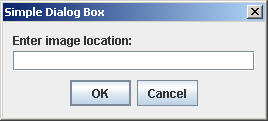
- public static BasicPicture loadBasicPic() -- This method will prompt the
user with the String "Enter image location: ". The method will then
create a new BasicPicture object by passing the user's response to the
appropriate constructor of the BasicPicture class. The return value is
a reference to the new BasicPicture that has been created. Your prompt
should look like the one below:
- public static void displayPic(String option, Picture picture) -- The
parameter "option" represents one of three valid choices. If the
option is "ProvidedPicture", then the method will display the picture
"picture" on the screen. If the option is "LastPicture", then the
method will display the last picture that was displayed most recently, and
the second parameter is ignored. (Hint: There is a method in the
PictureUtil class that can tell you what the last picture was. Look at
the JavaDoc.) If the option is "ClearScreen" then all of the images
are cleared from the screen and the second parameter is ignored.
- public static Picture processOnePic(Picture picture, String processing)
-- The parameter "processing" represents one of three valid choices.
If processing is "BlackAndWhite" then the return value is a reference to a
new BlackAndWhitePicture generated using the parameter "picture". If
processing is "Mosaic", then the return value is a reference to a new
"single picture mosaic" which has been created from the picture. (See
below for a description of what a "single picture mosaic" looks like.)
If processing is "Rotate" then the return value is a reference to a new
RotatedPicture generated from the picture.
- public static Picture processTwoPics(Picture pictureOne, Picture
pictureTwo, String processing) -- The parameter "processing" could represent
one of four valid choices. If processing is "CombineTopBottom", then
the return value is a reference to a new AboveAndBelowPicture object created
using the two pictures, in the same order as the order of the parameters. If processing is "CombineLeftRight" then the
return value is a reference to a new SideBySidePicture object created using
the two pictures in the same order as the order of the parameters. If processing is "Merged" then the return value is a
reference to a new MergedPicture object created from the two pictures in the
same order as the order of the parameters.
If processing is "Mosaic" then the return value is a reference to a new "two
picture mosaic" created from the two pictures. (See below for a
description of what a "two picture mosaic" looks like.)
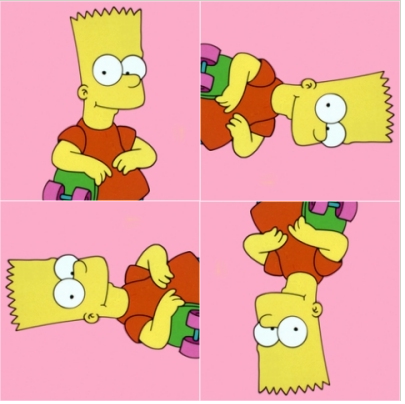
- private static Picture createOnePictureMosaic(Picture picture) -- The
return value is a reference to a "one picture mosaic". A "one picture
mosaic" is a picture that looks like the example below, which has been
created from the image Bart.jpg, which you have seen before. Note that
there are many different ways to generate this image and you are free to use
whatever technique you like! Here is the example of a "one picture
mosaic":
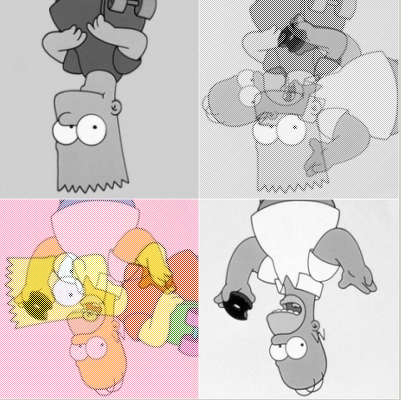
- private static Picture createTwoPictureMosaic(Picture a, Picture b)
-- The return value is a reference to a new "two picture mosaic". A "two picture mosaic" is a picture that looks like the
example below, which
has been created from the images Bart.jpg and Homer.jpg, respectively.
(Be sure to put them in the right order -- in this example, Bart.jpg is the
FIRST parameter.) Note that there are many different ways to generate
this image and you are free to use whatever technique you like! Here
is the example of a "two picture mosaic":
Requirements
- Your may only write a single class called PicViewer.
- You may write extra private static methods if you want to. You may
NOT write any methods that are not static or not private.
- We are grading your projects for appropriate commenting this time, as
discussed briefly in class. Each method should have a comment above
it. Other comments should be provided wherever clarification is
warranted.
- If your program is not displaying the pictures, you will receive no
credit.
- You must use meaningful variable names and good indentation.
- Input and output operations must be implemented using the
simpleDialogBox method, described above.
- You do not need to worry about incorrect input. You may assume that the responses the
user enters are the right types, and that he/she follows instructions.
- You should not modify the project specifications. For example, do not
add extra behavior or output.
- We
use an automated system to grade projects and it will not be able to
grade your project if you do not follow the project specifications
closely.
In particular, you must spell things exactly as we have spelled them and use
punctuation exactly as we have. You do NOT need to worry about how
many spaces to put between words in your output -- it doesn't matter.
- Just in case you know what an array is -- you may not use arrays (or any
Java collections of any kind) while implementing this project.
- Your
program must terminate without using anything like System.exit(). (Don't
worry if you don't know what that is.)
Grading
For this project, we are only providing a single release test, which will
check if your password checker is performing correctly. The rest of the
testing will be done SECRETLY while we are grading the projects. It is
your responsibility to do your own testing to make sure that your project is
performing as expected. Your grade will be determined as follows:
- Release test (just one) -- 15%
- Further "secret" testing -- 75%
- Style -- 10%
Challenge Problem
Modify the method processOnePic so that it can handle one more "processing"
option. If processing is "RandomMosaic" then you must create a mosaic
using the picture provided. The mosaic will consist of a two-by-two grid
of images, just like the other mosaics in the project. But this time each
of the four images will be generated RANDOMLY from the original image. To
generate each of the four images:
- Randomly rotate the original image either 0, 90, 180, or 270 degrees.
(Each of these possibilities should occur with 25% chance.)
- 50% of the time make the new image black and white.
Just to be clear, EACH of the four images in the mosaic should be created
separately following the two instructions above.
Note that the driver we have provided does not have the functionality to test
your new option! You should write your own test driver to check that it is
working. (When we test your project, we will use a driver that we have
written to check out whether or not you have implemented this method correctly.
We will not run your driver.)
If you do the challenge problem this time, please submit JUST ONE version of
your project as usual.
Web Accessibility