
| CMSC 122 | |
| Sections 0101, 0201, 0301 |
Hiding Game, Part II
This project will give you practice with event driven programming, functions, conditional statements, dynamic updates to webpage elements, using Document.writeln, and CSS.
This project is similar to the previous project, but requires you to implement a Graphical User Interface (GUI). Like before, the game goes through a sequence of days. On each day the user will hide in one of four possible hiding places, and one of the hiding places (selected randomly) will explode! The goal is to survive as many days in a row as possible without hiding in the location that explodes. It's about as fun as the previous project.
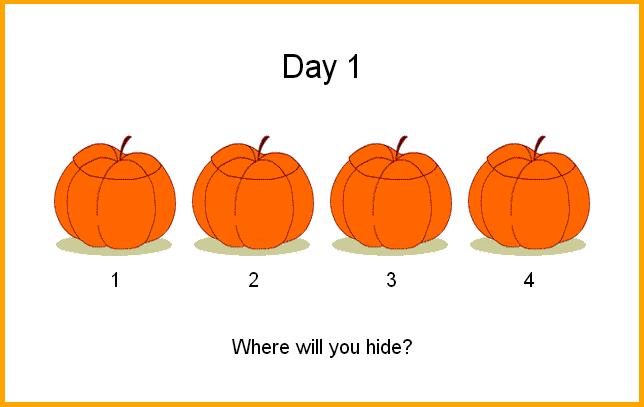
The project is probably easiest to understand by running this demonstration page. Your project should appear and function exactly like the demonstration page.
To begin the project, please download this file. It contains the three images that you will need for this project, which are also shown below.
 |
 |
 |
| pumpkin.gif | hide.gif | explode.gif |
You should begin by creating a table with four rows. The top row is where it says "Day X", the second row is where the images appear, the third row contains the numbers one through four, and the bottom row contains a message such as "Where will you hide?" Remember that you must use an identifier for any element that will change while the game is running.
For each of the images in the table, you should use "onclick" to run a function when the user clicks the image. Below we will describe a function called "hideMe", which should be called by onclick, passing in the picture number as an argument. For example, "hideMe(3)" should be called if the user has clicked the third picture.
We suggest using two global variables:
We suggest writing the functions below, although you are free to write the project any way you choose.
The parameter (location) represents the position where the user has clicked -- in other words, this is where they want to hide, either 1, 2, 3, or 4. The function should put the "hide.gif" picture in the place where the user has clicked (replacing the plain pumpkin picture). Next, the function should replace the text at the bottom of the screen with "GOOD LUCK!". Finally, make a call to the function below (explode) using the setTimeout technique and using 1800 milliseconds for the delay.
Use the following statement to select a random location for the explosion:
explosionLocation = Math.floor(Math.random() * 4) + 1;
Now put the image called "explode.gif" in the place where the explosion has occurred, and replace all three of the other images with "pumpkin.gif". Replace the text at the bottom of the screen with either "You live to see another day" or "You have died", depending on whether or not the user has hidden in the same place where the explosion occurred. Finally, make a call to the function below (conclusion) using the setTimeout technique and using 1700 milliseconds for the delay.
If the user has survived, increment your dayCounter and make a call to the "reset" function, described below.
On the other hand, if the user has died then you should:
This function should replace all of the images with the original "pumpkin.gif" picture, update the day counter at the top so that it reflects the correct day, and change the text at the bottom so that it says, "Where will you hide?".
You should create a zip file that includes your HTML file, your CSS file, and all three images. You will not receive credit for submitting a file that is not a real "zip" file. In particular, "rar" files or "7z" files will not be graded. Submit the zip file to the submit server, as usual. You may submit as many times as you like -- we will only grade the last submission. Late submissions received up to 24 hours beyond the deadline will be accepted, but will be penalized 20 points. No submissions will be accepted more than 24 hours past the deadline.