Objective:
- To practice HTML fundamental constructs.
Overview
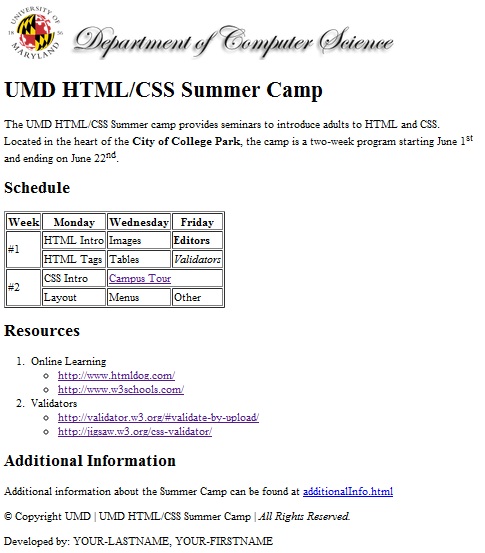
For this project you will write a web page providing information about an imaginary summer camp. The web page provides some general information, a schedule, and a list of resources. A snapshot of the web page you are expected to implement can be found in the Web Page Image section.
Important Reminders
- This is NOT a group project. You are expected to do all of the work by yourself. If you are stuck or have questions, please drop by to see one of us during office hours. Please do not ask us to inspect your code via email.
- Do not put your solution to this (or any) graded assignment on a web server. In particular, do not put your project on Terpconnect. If you do this then other students can copy your solution, and YOU will be prosecuted for cheating.
Specifications
Before you start implementing the web page download the zip file: p1.zip. This file has a folder named p1 which contains three files. The p1.html file is an empty file you will use to write the HTML that represents your page. The other two files are images associated with the web page you will create. After downloading the zip file, immediately try to submit your project by uploading the zip file to the submit server (as described in class and below). Please do not wait until the project is due to verify you can submit the project.
Below is information to guide you in creating the elements found on the webpage:
- Images - Include the provided images at the top of the web page.
- Introduction - Create a header named "UMD HTML/CSS Summer Camp". This header should use the h1 tag.
- Introduction paragraph - Define a paragraph with the message you see on the web page image. Notice that the text "City of College Park" is in bold. Do not worry about when the first line ends and the second one begins (this depends on the browser's window size).
- Define a header named "Schedule". This header should use the h2 tag.
- Define a table with the information you see on the web page image. The table must use a border size of 1. The "Campus Tour" link is a link to the website located at the following URL: https://www.admissions.umd.edu/explore/TerrapinTour.php
- Define a header named "Resources". This header should use the h2 tag.
- Define the lists you see on the web page image. The lists have links that you must define (i.e., we should be able to click on the link and reach the specified site).
- Additional Information (see section below)
- Define the copyright symbol followed by "Copyright UMD | UMD HTML/CSS Summer Camp | All Rights Reserved." Notice that "All Rights Reserved." is in italics.
- The last part of your page is the text "Developed by: YOUR-LASTNAME, YOUR-FIRSTNAME" where you have provided your last and first name. For example, if your name is Mary Smith, the text will be: "Developed by: Smith, Mary"
Additional Information Section
You will add a link to a page called additionalInfo.html where you will provide data/information for the Summer Camp organization. You need to evaluate data/information in order to define the most effective way to present it so those interested in the camp and attending the camp can find everything they need. The data/information of interest is the following:
- Map of the City of College Park
- Map of the UMD Campus
- Directions to UMD
- Online resources available to campus visitors
- Bookstore information
- Add your own data/information items
Feel free to add links, images, etc. This is your opportunity to be creative :)
Requirements
- You must use good indentation.
- Your web page(s) must be implemented using HTML5 and must validate according to the http://validator.w3.org/#validate-by-upload validator.
- You may not use any authoring tool (e.g., frontpage, dreamweaver, etc.) which generates the HTML code for you.
- Your web page must correspond as closely as possible to the web page image we have provided at the end; do not add anything extra. The sizes of your images must be approximately the same as ours.
- You must implement this project by yourself.
- You should not use cascading style sheets for this project.
- Do not post your project in a web site (e.g., do NOT post in TerpConnect) as people will see your code.
- Make sure you view your code using Chrome (that is the environment we will use to grade your project).
- When referencing your images (e.g., <img src =) do not use absolute paths (e.g., C:\...). Just specify the name of the image.
- If you include links in your document that use the & symbol, then you need to replace that symbol with & otherwise your validation may fail.
Web Page Image