CMSC 434
Homework #3 Part B - 6% of Course Grade
Spring 2003
Due April 2nd, 2003
at class time.
Note: I suggest starting and completing it before the break,
or by Monday March 31st at the latest...
Aw, come on, just 5 more minutes....
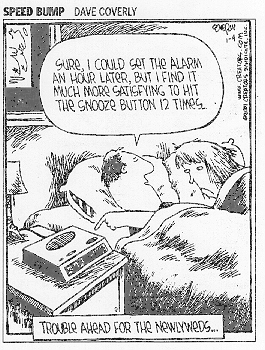 Just about everybody can probably tell you some details of their ideal
alarm clock. Local lecturer Charles Lin even created a web page to describe
his (http://www.cs.umd.edu/~clin/Links/Alarm.html).
Just about everybody can probably tell you some details of their ideal
alarm clock. Local lecturer Charles Lin even created a web page to describe
his (http://www.cs.umd.edu/~clin/Links/Alarm.html).
In this homework, you will create an alarm clock using Visual Basic. You
need to decide how you would like it to appear (digital? analog?) and exactly
what features it should have as well as how to access these features. We've
looked at Visual Basic a little already, but typing "visual basic tutorial"
into your search engine of choice will provide you with many options!
The following is an example from The Design of Everyday Things in
which someone intentionally created a confusing interface for an alarm clock /
cd player / tv / radio / etc...
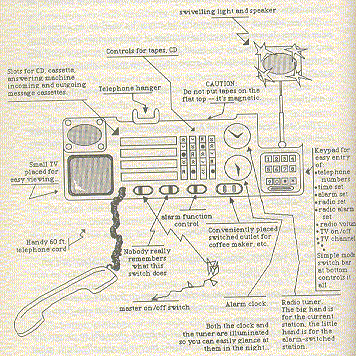
Notice how you can't tell which is the time and which is the radio station.
Minimum requirements for this homework:
display current time and date and day of week
be able to set the alarm time by time and day of week
have at least two alarms that can be set
have it work so that if I set the alarm and leave the program running
the alarm will "go off".
- The alarm going off should play a WAV file.
I have included
a small WAV file in the ZIP file listed below. This should be submitted
in the directory you zip together and submit and should be the default WAV
that is played when the alarm goes off.
- I would also like you to add the ability for the
user to select
a different WAV file. However, do not include any other WAV files in your
submission - we'll have several WAV files on our testing machine.
a text file in which you discuss how you gathered information about the
tasks for which this might be used as well as the options that users want
to see
A short code example is posted
here
for a simple Visual Basic
application that displays the current time and also
plays and stops playing a WAV file. Feel free to use any
part of this code example in your project.
We are focusing on the interface, so don't worry about making all
of the features actually work, but rather focus on creating the interface.
For example, if I want a snooze alarm that can be set to go off again
in either 1, 5 or 10 minutes I will need to design the interface to allow
the user to set it (dial? buttons? pull-down menu?) but I don't need
to actually have it so that when they alarm goes off and the user clicks
on the snooze button, that the alarm actually goes off again in the
correct number of minutes. There will be points assigned to the level of
detail in implementing the program, but the vast majority of points are
attached to issues such as layout, task-centered and user-centered design,
positive transfer and affordance, etc.
You will need to submit this via e-mail. Send your submission as
a zipped file containing all of the files for your project. We will
extract these to a directory, open your Visual Basic project file
and compile and run it. I suggest that you test things out by sending
the zipped file to yourself, extracting it in a WAM lab and trying it
out from scratch just like we will.
The e-mail address to which you
should send this project is
eg434003@wam.umd.edu. Along
with the zipped file attachment, the body of the mail message needs to have
your name and your student ID number so that we easily know who you are. Of
course, your code should be commented, and your name will appear there
as well.
Web Accessibility