HW4 - Option 2
Just follow the lines...
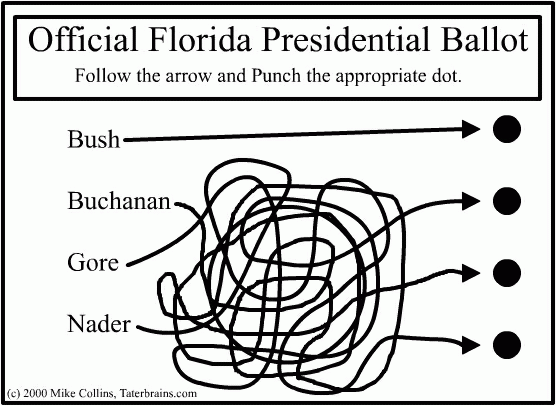 Creating a simple ballot is not an easy task. You need to present all
options, provide various information, and have the user be able to use
it correctly the first time with no help.
Creating a simple ballot is not an easy task. You need to present all
options, provide various information, and have the user be able to use
it correctly the first time with no help.
In this homework, you will create an eBallot to appear on a 1024x768
touchscreen. You will use the mouse to click on things but need to
make them touchscreen-friendly. Your goals include making sure people
do not overvote (vote for more people than they are allowed to). You
also don't want people to accidentally undervote (forget to vote in
some category).
We've looked at Visual Basic and Visual C# a little already, but typing
something like "visual basic tutorial"
into your search engine of choice will provide you with many options!
There is a sample ballot at
http://resources.co.ba.md.us/Documents/Elections/ballotstyle5.pdf
from which you can get the information. You need to create a UI that
will allow the user to start, select, and submit. Keep in mind things
from the 2000 elections in Florida such as people double-punching the
ballot (eg: they punched for Buchanan and then realized their mistake and
punched for Gore).
Minimum requirements for this homework:
vote for all positions and issues
be able to change your mind
not be able to submit an invalid ballot
not forget to vote for some position or issue
be easy to use on a touchscreen for all potential users (if there
are some users that will be unable to use your interface, you need to
explain who they are and why you did not design for them)
a text file in which you discuss how you gathered information about the
tasks for which this might be used as well as the options that users want
to see
A short code example for a simple Visual Basic application that
displays the current time and also plays and stops playing a WAV file
is posted in
VB6
and
VB.NET
Feel free to use any
part of this code example in your project.
For this homework, do not worry about security-related issues (and there
are plenty of those) in eBallots - just the UI.
You will need to submit this via e-mail. Send your submission as
a zipped file containing all of the files for your project. We will
extract these to a directory, open your Visual Basic or Visual C# project file
and compile and run it. I suggest that you test things out by sending
the zipped file to yourself, extracting it on a WAM machine (like the
ones in the first floor AVW WAM lab) and trying it out from scratch
just like we will.
The e-mail address to which you
should send this project is
eg43404@wam.umd.edu. Along
with the zipped file attachment, the body of the mail message needs to have
your name and your student ID number so that we easily know who you are. Of
course, your code should be commented, and your name will appear there
as well.
Web Accessibility