| Project #3 |
CMSC 198N |
| Due Saturday March 3, 6:00 pm |
Spring 2007 |
Objective
To implement a web page using cascading styling sheets.
Overview
For this project you will write an html file (umdSite.html) and two
cascading styling sheets (navigationLeft.css and navigationTop.css). The
umdSite.html file is associated with both sheets (you can switch from one to the
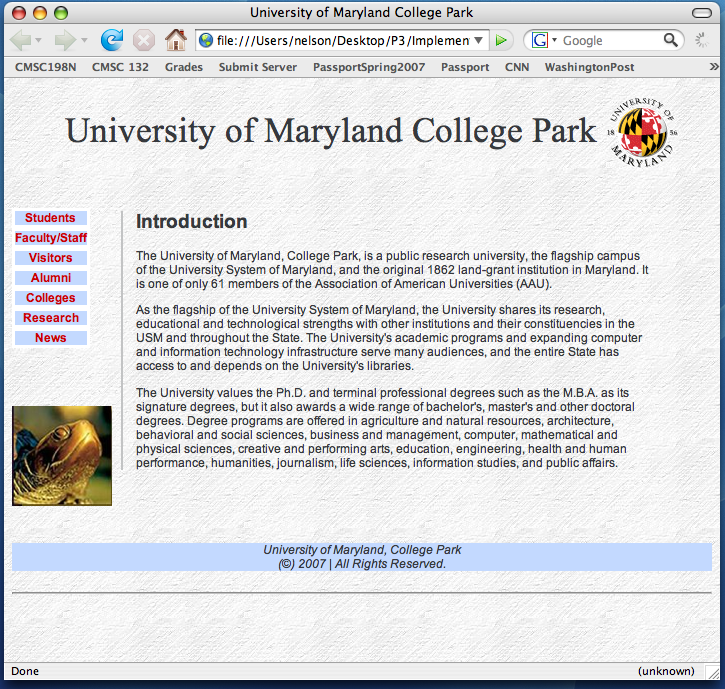
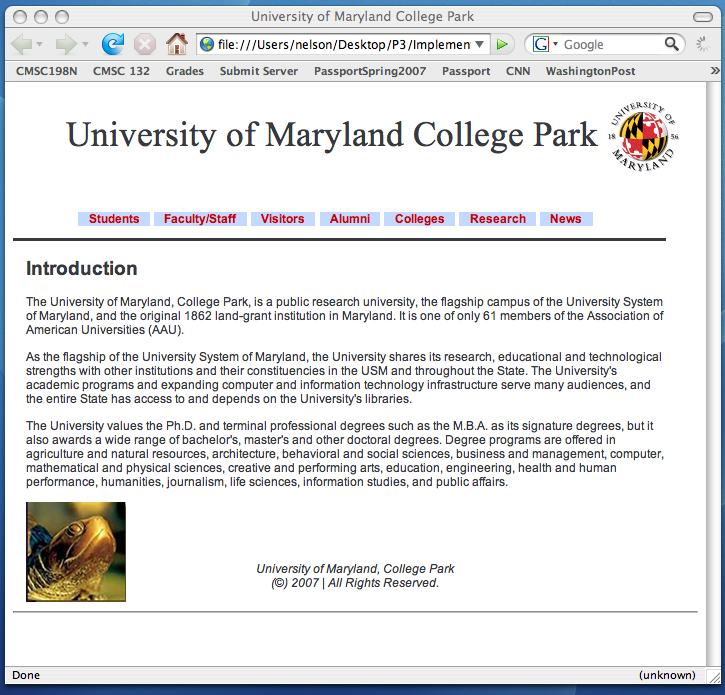
other by using the Firefox option "View-Page Style..."). An snapshot of how the
umdSite.html file looks like for each style sheet can be found at: Web Page Images.
Before you start implementing the web page, download the following zip file:
p3.zip. This file has a folder
named p3 which contains some files you will need for your web page. After downloading the zip file, immediately try to submit your project by
uploading the zip file to the submit server (as described in class and below). Please do
not wait until the project is due to verify you can submit the project.
Grading
Your style sheets should generate a web pages
that closely resembles the Web Page Images we have
provided.
Requirements
- You cannot use tables (<table> tag) to define the layout of the web
page.
- The only html file you can create is umdSite.html
- The only style sheet files you can create are navigationLeft.css and
navigationTop.css
- Make sure you put all your files in the p3 folder.
- The umdSite.html file must have <link> entries that associate the html
file with the two style sheets. Use "NavigationLeft" and "NavigationTop"
as titles
- Set each of the links (e.g., Students, Faculty/Staff, Visitors, etc.) to
a web page in the University web site (http://www.umd.edu/)
that provides some information related to the link (it does not matter which
page you link to).
- When you hover over the different links (e.g., Students, Faculty/Staff,
etc.) the background color of the box associated with the link must change
to silver, in order to represent that the link is currently selected
- You may not use any authoring tool (e.g., frontpage, dreamweaver, etc.)
which generates the css code for you
- Your web pages must correspond to the web page
images we have provided at the end. Do not add anything extra
- You must implement the web page by yourself
- Do not post your project in a web site (people will see your code)
- Make sure you view your code using Firefox 2.0 (that is the environment
we will use to grade your project)
Hints
You don't need to follow these hints. If you get the project
done without them that is fine.
- When setting the position of a box you can use negative values (e.g.,
top: -10em)
- The vertical-align property allows to set the position of a line.
- The width property allows you to set the width of a box
- The display property allow us to define the display type of a box.
Two helpful values are inline and block. For example, you can change
the display type for items in a list from block to inline.
- Feel free to explore/use any CSS properties
- The following link provides a color reference:
http://www.modernlifeisrubbish.co.uk/article/web-2.0-colour-palette
Web Page
Images
Using Page Style "NavigationLeft"
Using Page Style "NavigationTop"
Submission
To submit your project, follow these steps:
- Create a zip file that includes the p3 folder (if you have WinZip in
your computer you can perform this by selecting the folder, right-clicking
and then selecting "Add to Zip file...")
- Upload the zip file using the submit server available at: https://submit.cs.umd.edu:8443/.
Make sure you select the submit server entry (Project #3) that corresponds
to this project.
- After submitting your project make sure you download the submitted file
and verify that what you have submitted is correct. Please do not
e-mail your project.
Academic Integrity
Please make sure you read the academic integrity section of the syllabus so
you understand what is permissible in our programming projects. We want to
remind you that we check your project against other students' projects and any
case of academic dishonesty will be referred to the
University's Office of
Judicial Programs.
Web Accessibility