Objective
To practice one and two dimensional arrays.Grading
- (30%) Sudoku board function implementation
- (10%) Correct coloring of sudoku board
- (10%) Recognizing valid/invalid rows (Functionality for the "ValidateRows" button)
- (10%) Recognizing valid/invalid columns (Functionality for the "ValidateColumns" button)
- (20%) Recognizing valid/invalid squares (Functionality for the "ValidateSquares" button)
- (10%) Recognizing a valid/invalid sudoku board (Functionality for the "ValidateSudokuBoard" button)
- (5%) Good indentation
- (5%) Good variable names
Overview
Sudoku is a game where the player is expected to complete a grid with
numbers so that every row, column, and 3 by 3 grid (differentiated by
shading) has every digit from 1 to 9 (inclusive). The following is an
example of a sudoku (solved) board:
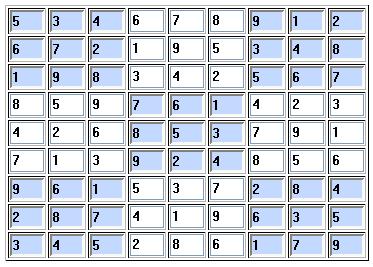
For this project you will implement a sudoku validator that determines whether the current values in a sudoku board represent a solved sudoku.
The following file (project distribution) is associated with this project: p7.zip.
Specifications
- You must define a board with text fields where the user can enter numbers (see "Sample Run").
This board must be generated using a function named "createBoard". The function has
the following prototype:
function createBoard(boardValues);
The funcion defines a board with the dimensions and the values associated with the two-dimensional array named boardValues. This function should be able to create a board with any dimensions (e.g., 3x3, 6x6, etc.). You do not have to worry about the correctness of colors for boards other than 9 x 9. - The initial contents of the board is defined by the array returned by the function getDefaultValues() which you can find in the p7.html file.
- You must define a button named "Reset Board" that resets the board values to those associated with the array returned by getDefaultValues().
- You must define a button named "ValidateRows" that determines whether ALL the rows of the board are valid (notice that columns and/or squares can be invalid even if rows are valid). A valid row is one that has digits 1 through 9. If the rows are valid the program will display (using alert) the message "Valid Rows". Otherwise the message "INVALID ROWS" will be displayed.
- You must define a button named "ValidateColumns" that determines whether ALL the columns of the board are valid (notice that rows and/or squares can be invalid even if columns are valid). A valid column is one that has digits 1 through 9. If the columns are valid the program will display (using alert) the message "Valid Columns". Otherwise the message "INVALID COLUMNS" will be displayed.
- You must define a button named "ValidateSquares" that determines whether ALL the nine squares of the board are valid (notice that rows and/or columns can be invalid even if squares are valid). A valid square is one that has digits 1 through 9. If the squares are valid the program will display (using alert) the message "Valid Squares". Otherwise the message "INVALID SQUARES" will be displayed.
- You must define a button named "ValidateSudokuBoard" that determines whether the board represents a solved sudoku game (one where rows, columns, and squares are valid).
Additional Requirements
- You must implement and use the function createBoard.
- You must name your html file p7.html.
- For this project we will not have any .css nor .js files (everything will be in the file p7.html).
- You must use good identation.
- You must use meaningful variable names.
- You may not use global variables.
- You are not required to validate your project.
Sample Run
You can see a video for the game by downloading the file sudoku video or by the embedded video below.