| Project #0 |
CMSC 131 |
| Due Friday, 2/8 at 11:00PM |
Object-Oriented Programming I |
| Type of project: Open |
Spring 2008 |
Important Dates in Computer Science History
Objective
This project will make sure that you have installed all of the class tools,
that you can check-out projects, save your work, and submit projects. You
may also learn about a couple of interesting facts about the history of Computer
Science.
Historical Developments
This project allows you to read a little about the historical developments in
computer science from a web page at
http://www.softlord.com/comp/ .
You will only need to know a few dates to fix the project so it is giving the
correct information.
Overview of What You Must Do For This Project
We have written a project called "Spring08Proj0", which has been copied to your
personal CVS repository. Your job is to do the following:
- Download and Install Java, Eclipse, and the course plug-ins onto your computer
(unless you are working in a lab on campus.)
- "Check out" the project. (That means copy it from your CVS
repository onto the computer you are working on using the CVS Repository
Perspective.)
- Using the Java Perspective, edit the project (as described below and in
the file itself) and then save your work.
- Run the project and read what is on the screen to make sure it looks
correct.
- Submit the project for testing and grading.
Detailed descriptions of these four steps follow:
1. Install the Course Tools
Detailed instructions for installing the course tools can be found
by
following this link. It is important that you follow those
instructions very precisely so that you will have the correct versions of all of
the tools. In a nutshell, you will do these things:
- Install the Java SDK.
- Copy the Eclipse zip file to your computer.
- Extract the contents of the zip file.
- Run Eclipse and install the course-specific plug-ins.
2. "Check Out" the
Project
- Get your class account. If you have not already done so,
login to the grades server (grades.cs.umd.edu)
to obtain your class account and password. The account ID will have
this format: cs131XXX. (You will need your University of
Maryland directory ID and password to access the grades system.)
- Create a CVS Connection. If you have not already done so,
you will need to create a "CVS connection" in the CVS repository perspective
of Eclipse. You only need to do this once on any particular
machine that you want to work on. (The same CVS connection can be used
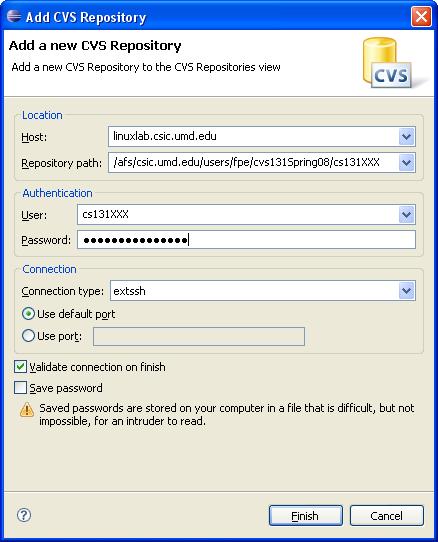
on that computer for the entire semester.) Here's how to do it:
After changing to the CVS repository perspective, right-click the
left-hand portion of the screen (under the tab that says "CVS repositories")
and select "New, Repository Location". This will bring up a dialog box
with lots of things for you to fill in. Fill in the fields so that
they look exactly like this
screenshot. You should use your class account ID in the two
places where it says "cs131XXX", and you should type the corresponding
password into the box that says password. Everything else
should be copied so that it looks exactly like the screenshot. Note
that the connection type must be changed to extssh.
- Check Out the project. Click the little "+" (or
triangle) next to the CVS
connection that you created. Then click the little "+" (or
triangle) next to the
word "HEAD". You should be able to see an entry that says
"Spring08Proj0". Right-click this folder, and select "Check Out".
That will copy the project files to the computer that you are working on.
3. Edit the Project and Save
- Switch over to the Java perspective. On the left side of the
screen (under the tab that says "Package Explorer") you will see the project
"Spring08Proj0". Click the little "+" (or
triangle) next to the folder. Now
click the little "+" (or triangle) next to "default package". You should see a file
called "ComputingHistory.java". This is the file you
must edit! Double-click this file and it should open in the editor on
the right-side of the screen.
- Try running the program. Make sure that the file is open in the
editor, and then select Run, Run As, Java Application from the menu
at the top. You should see the output in the "console" window at the
bottom of the screen.
- Modify the contents of the file so that it has the correct information
including the correct dates which you can find in the following web page
http://www.softlord.com/comp/ . You will
find more specific instructions in the file itself -- you'll see what we
mean when you open the file.
- When you're done, save your work by clicking the little disk icon at the
upper left or by selecting "File, Save" from the menu at the top.
- Run it again to make sure it works as expected -- if not, edit the file
to repair it, save, and try running it again. If you get stuck, drop
by to visit one of us during office hours!
4. Submit the Project
- To submit, right-click the project folder (in the "package explorer"
window within the Java perspective) and choose "Submit Project". If you
do not see the "submit" option, then your plug-ins were not installed
correctly!
- Go to the submit server (submit.cs.umd.edu)
to see if you passed the tests. If you didn't pass the tests, fix up the project
source file, test it
and then submit it again!
Grading
There are six release tests that you must pass for this project.
Together these comprise 100% of the project grade. There are no public
tests so you should have a 0/0 for public tests on the submit server - this
means 0/0 is a perfect score for the public and 100/100 is a perfect score for
the release tests. If you don't pass any of the release
tests, you don't get any points.
Web Accessibility