Objectives
- To practice HTML fundamental constructs.
- Learn how to access the WAM web page repository.
Overview
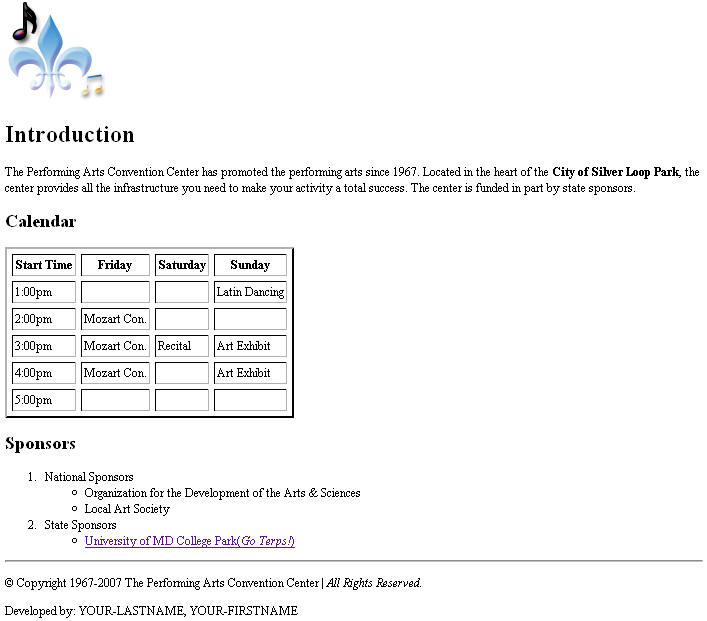
For this project you will write a web page providing information about a convention center. The web page provides some general information, a calendar and a list of sponsors. An snapshot of the web page you are expected to implement can be found in the : Web Page Image section.
In addition you will access your WAM web page repository and place a simple html file (more information below).
Grading
- (5 pts) Logo
- (10 pts) Headers
- (30 pts) Calendar table
- (15 pts) Sponsors lists
- (10 pts) Page validates according to http://validator.w3.org/#validate-by-upload
- (10 pts) Correct indentation
- (10 pts) Other page elements
- (10 pts) WAM Web Page Requirement
Notice that you don't have to submit a complete web page in order to receive credit for this project. We will look at each one of the above items individually.
Specifications
Before you start implementing the web page, download the following zip file: p1.zip. This file has a folder named p1 which contains two files. The p1.html file is an empty file you will use to write the HTML that represents your page. The logo.png file represents the logo image associated with the web page. After downloading the zip file, immediately try to submit your project by uploading the zip file to the submit server (as described in class and below). Please do not wait until the project is due to verify you can submit the project.
The web page components are:
- Logo - Include the logo.png image at the top of the web page.
- Introduction - Create a header named "Introduction". This header should use the h1 tag.
- Introduction paragraph - Define a paragraph with the message you see on the web page image. Notice that the text "City of Silver Loop Park" is in bold. Do not worry about when the first line ends and the second one begins (this depends on the browser's window size).
- Define a header named "Calendar". This header should use the h2 tag.
- Define a table with the information you see on the web page image. The table must use a border size of 2, a cellspacing attribute with a value of 5, and cellpadding with a value of 5.
- Define a header named "Sponsors". This header should use the h2 tag.
- Define the lists you see on the web page image. The "University of MD College Park (Go Terps!)" is a link to the web site http://www.umd.edu. Notice that "Go Terps!" is in italics.
- Define a horizontal line (hr tag).
- Define the copyright symbol followed by "Copyright 1967-2007 The Performing Arts Convention Center | All Rights Reserved.". Notice that "All Rights Reserved." is in italics.
- The last part of your page is the text "Developed by: YOUR-LASTNAME, YOUR-FIRSTNAME" where you have provided your last and first name. For example, if your name is Mary Smith, the text will be: "Developed by: Smith, Mary"
Requirements
- You must use good indentation.
- Your web page must be implemented using XHTML 1.0 (Strict) and must validate according to the http://validator.w3.org/#validate-by-upload validator.
- You may not use any authoring tool (e.g., frontpage, dreamweaver, etc.) which generates the HTML code for you.
- Your web page must correspond to the web page image we have provided at the end. Do not add anything extra.
- You must implement the web page by yourself.
- You cannot use cascading style sheets for this project.
- You cannot add any image (aside from the logo.png).
- Do not post your project in a web site (people will see your code).
- Make sure you view your code using Firefox 2.0 (that is the environment we will use to grade your project).
Web Page Image
WAM Web Page
Place a folder named 198N in your wam web page folder (as described in lecture). The 198N folder will have a file name index.html whose contents is your name, and a list (three items is enough) of your favorites web sites.