Objectives
- To practice JavaScript, focusing on loops.
- To review HTML and CSS.
Overview
For this project you will create a dynamic webpage using JavaScript.
The user will first be asked a few questions, and then the webpage
will be generated based on the information they have entered.
Your program will begin by using the prompt function to read
in four pieces of information from the user.
The prompts should look like the following:
- What is your name?
- What word describes you?
- What is your favorite number?
- What is your favorite color?
Based on the responses to those questions, a webpage will be generated. Below are two
examples of how the webpage must appear:
- Example 1. This example was generated using the
following answers to the four questions:
- Fred
- funny
- 5
- green
-
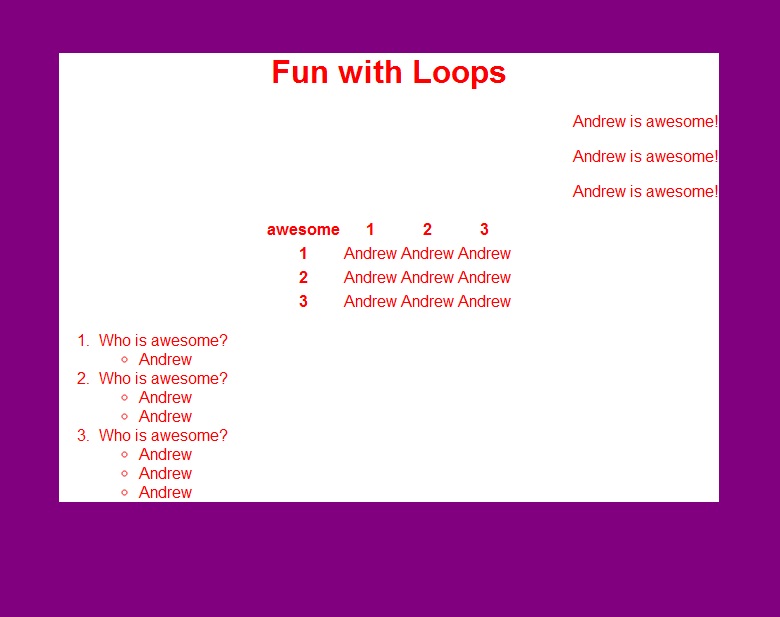
Example 2. This example was generated using the
following inputs:
- Andrew
- awesome
- 3
- red
Warning: This project requires a significant amount of time. Please start working on
the project early. Office hours get busy during the few days before
the project is due, and you may not get the help
you need if you wait too long. As always, we will not grant project extensions due to
technical problems on your end.
Hints:
-
Don't forget that the main tool for generating HTML from a JavaScript program is
document.writeln.
- You should use a table element for the part in the middle. You will need to
use nested loops.
- You should use a list containing lists for the part at the bottom. You will need to
use nested loops.
- We suggest putting the main contents (the white part) in a division so that you
can easily apply style properties to the whole thing at once.
- You should use a separate CSS file to set all of the style
properties except for one thing: To set the color that was selected
for the internal elements, you will need to apply a style rule
directly within the HTML that is being generated by your JavaScript program.
Recall that the
"style" attribute can be applied to any element.
Requirements:
- You must create two files, named: proj3.html and proj3.css. The
HTML file will link to the CSS file, as usual.
- Your webpage must look exactly like the sample pages, and must
work correctly for any reasonable inputs. (The "favorite number" can be
any positive integer, and the color can be any color that is recognized
by Google Chrome.)
- The only font you may use is arial.
- Elements must be aligned in the same way we have them.
- The background color for the whole page must be purple.
- The background color for the box in the middle must be white.
- The page must look correct when it is resized.
- Both your html and your CSS must validate according to these validators:
- You must use proper indentation.
- Be sure to test your project with the Chrome browser -- that is how we will test it.
- You may not use any authoring tool (Dreamweaver, Frontpage, etc.) that generates the HTML for you.
- You must implement this project by yourself.
- DO NOT POST YOUR SOLUTION TO THIS PROJECT ON ANY WEB SERVER.
Submission
To submit your project, follow these steps:
- Create a zip file that includes two files:
- Upload the zip file using the submit server available at: https://submit.cs.umd.edu/.
Make sure you select the submit server entry (Project #2) that
corresponds to this project.
- After submitting your project, make sure you download from the submit
server the submitted file and verify that what you have submitted is
correct. Important: you must uncompress (extract) what you download
from the submit server, otherwise it may not be rendered correctly.
We will not accept projects sent via e-mail.
Academic Integrity
Please make sure you read the academic integrity section of the syllabus
so you understand what is permissible in our projects. We want to remind you
that we check your project against other students' projects and any case of
academic dishonesty will be referred to the University's Office of Student Conduct.
Web Accessibility