Objectives
- To practice Forms and Arrays.
- To review HTML, CSS, and basic JavaScript.
Overview
For this project you will implement a webpage that displays the names of the 50 most populated countries in the world. The user can select a color and a font with which to display the country names. They also have the ability to filter the names by length. Finally, the user can filter the country names by choosing to exclude countries containing any combination of the letters 'N', 'A', or 'O'.
Demonstration
Here is a video that demonstrates what your webpage should look like and how it will work. Please note that this video has sound (I recorded myself talking) so be sure to have your sound on.
Below is a screenshot of the program, for your reference:
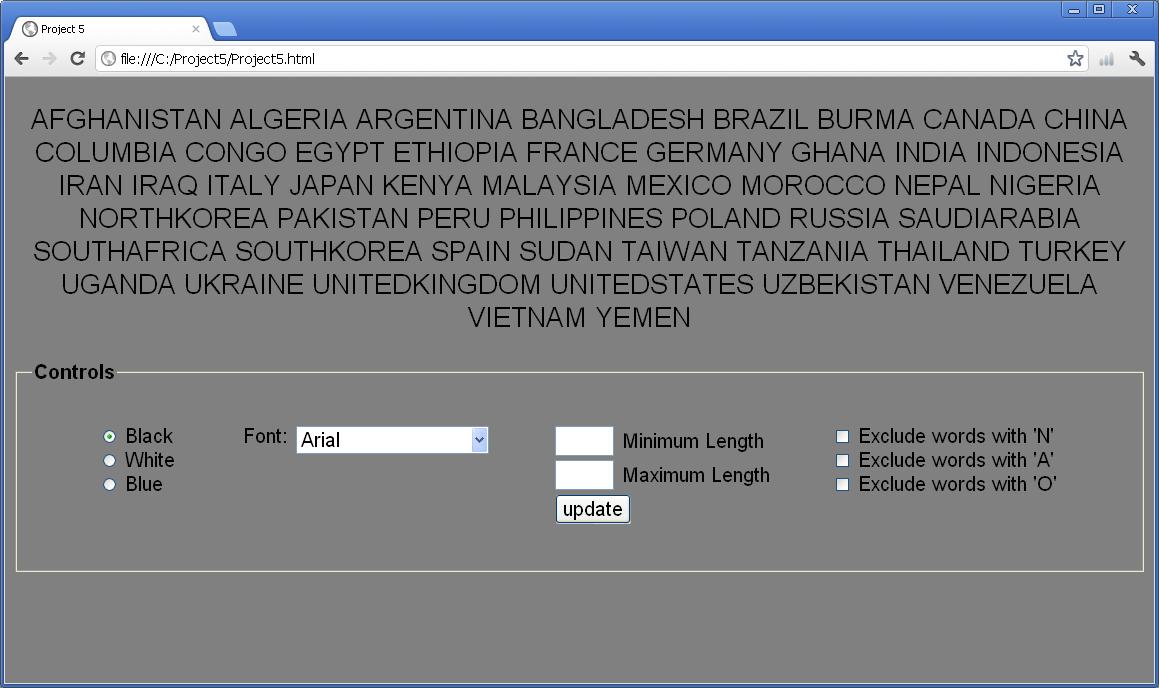
Files
To begin this project, please download the following zip file. Unzip it. You will find a folder called p5, which contains the file proj5.html. This file already contains a short script in which the array of country names is provided for you (to save you from typing in 50 country names!) You may either put your JavaScript in the HTML file, or move it to a separate proj5.js file -- it is up to you. As much as possible, you should put your style rules into a separate file called proj5.css.
Warning
This project requires a significant amount of time. Please start working on the project early. Office hours get busy during the few days before the project is due, and you may not get the help you need if you wait too long. As always, we will not grant project extensions due to technical problems on your end.
Hints:
- There is a function called "indexOf" that can be used to locate a particular character
within a string. Examples:
- If s is the string "abcdefg", then the expression
s.indexOf("d")would return 3 because the character "d" can be found at position 3 in the String. (Don't forget that we start counting with 0.) -
If s is the string "abcabc", then the expression
s.indexOf("c")would return 2 because the first occcurence of "c" is at position 2. - If s is the string "abcdefg", then the expression
s.indexOf("z")would return -1 because the character "z" is not found anywhere in the string.
- If s is the string "abcdefg", then the expression
- You will need to check whether or not the entries in the textboxes are numbers or not.
To check if a value is "not a number", you may use the built-in function "isNaN". For
example, to test whether or not the variable x is "not a number", you can use:
if (isNaN(x)) { ... } - I suggest writing a function with the prototype shown below. The parameter originalList
represents an array of strings. This function will return a new array containing all of
the strings from the original list that have a length between min and max.
function filterByLength(originalList, min, max)
- I suggest writing a function with the prototype shown below. The parameter originalList
represents an array of strings, and the parameter letter represents a string with just one
character, like "A". This function will return a new array containing all of the strings
from the original list that do not contain the letter specified.
function filterByLetter(originalList, letter)
Requirements:
Radio Buttons for Colors
- Have the program begin with the radio button for "Black" already selected.
- The color selected applies only to the list of country names (not to any of the controls).
- The color for the country names should change immediately when the user selects one of the radio buttons
- The radio buttons must work cooperatively, so that at all times exactly one radio button is selected.
List Box for Fonts
- The font selected applies only to the list of country names (not to any of the controls).
- The font for the country names should change immediately when the user selects one of the options from the menu.
- The fonts that you should use are Arial, Times New Roman, and Courier New.
Text Boxes for Length Filtering
- Typing into these boxes does NOT immediately change the list of country names. The list will be updated to reflect the selected length restriction when the user clicks the update button.
- If either of the textboxes contains a value that is not a number, then these entries have no effect on the list of country names. (See the hint about "isNaN", above.)
- If either of the textboxes is blank then these entries have no effect on the list of country names. (I.e., words of all lengths will appear in the list.)
- If the number entered for the minimum is larger than the number entered for the maximum then no country names should be displayed at all.
Checkboxes for Letter Exclusion Filters
- Each of the checkboxes represents a filter that will exclude names from the list that contain a particular letter.
- Each checkbox takes effect immediately when it is selected
- Each checkbox ceases to take effect immediately when it is de-selected
- Checkboxes must be applied together in any combination. For example, if the user has selected "no A's" and also "no N's" then the names that are displayed should contain neither A's nor N's.
General
- The min/max length boxes and the checkboxes for exclusions must work together. In other words, these are filters that can be applied simultaneously, and in any combination. For example, if the range of lengths is specified as 6 to 8, and the checkboxes for "exclude N" and "exclude A" are selected, then the program will show all countries whose names have lengths between 6 and 8 and do not contain any N's or A's.
- You must use the Label tag for all controls other than the listbox.
- You must create two files, named: proj5.html and proj5.css. The HTML file will link to the CSS file, as usual. You may create a separate proj5.js file if you choose to.
- Your webpage must look exactly like the screenshot above, and must behave as illustrated by the video.
- Your project should work properly for any sequence of actions the user takes (not just the particular sequence of actions that I happened to demonstrate in the video).
- Elements must be aligned in the exact same way we have them. In particular, both the country names and the controls should be centered horizontally within the browser. Also note that there is some spacing between the controls. Finally, please notice that the tops of the controls are all aligned with each other.
- The background color for the whole page must be grey.
- Both your html and your CSS must validate according to these validators:
- HTML validator: http://validator.w3.org/#validate-by-upload
- CSS validator: http://jigsaw.w3.org/css-validator/#validate_by_upload
- You must use proper indentation.
- Be sure to test your project with the Chrome browser -- that is how we will test it.
- You may not use any authoring tool (Dreamweaver, Frontpage, etc.) that generates the HTML for you.
- You must implement this project by yourself.
- DO NOT POST YOUR SOLUTION TO THIS PROJECT ON ANY WEB SERVER.
Submission
To submit your project, follow these steps:
- Create a zip file called p5.zip that includes the following files:
- proj5.html
- proj5.css
- If you chose to put your JavaScript into a separate file, please include that one too.
- Upload the zip file using the submit server available at: https://submit.cs.umd.edu/. Make sure you select the submit server entry (Project #5) that corresponds to this project.
- After submitting your project, make sure you download from the submit server the submitted file and verify that what you have submitted is correct. Important: you must uncompress (extract) what you download from the submit server, otherwise it may not be rendered correctly. We will not accept projects sent via e-mail.
Academic Integrity
Please make sure you read the academic integrity section of the syllabus so you understand what is permissible in our projects. We want to remind you that we check your project against other students' projects and any case of academic dishonesty will be referred to the University's Office of Student Conduct.