General Java/Eclipse/CVS Resources for CMSC 433
Development EnvironmentIn order to complete the projects for this course you will be using an integrated software development tool (or IDE) called Eclipse. If you are planning on working from your own PC, you must visit the following link and follow the instructions there on how to setup the Eclipse environment so that it works for our class. http://www.cs.umd.edu/eclipse
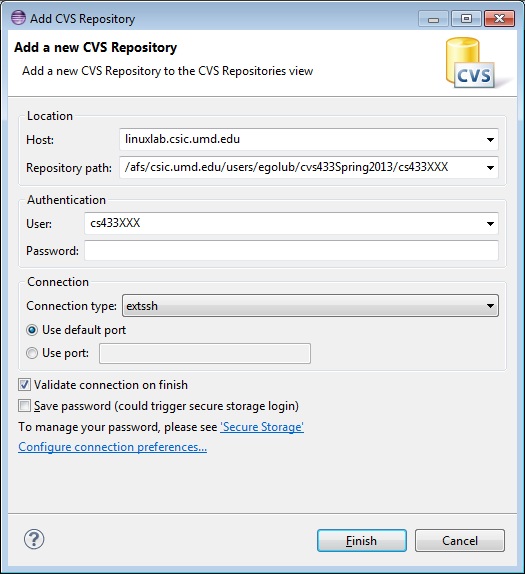
Click here for a screenshot of the CVS Connection Dialog Box for this semester. You can cut and paste the following lines into the dialog box:
NOTE for Mac users:
While connecting to the CVS repository you may get a message
indicating you cannot connect to linuxlab.cs.umd.edu.
If that is the case, try the following: ssh -l YOUR_LINUXLAB_ACCOUNT_ID linuxlab.cs.umd.edu Notice -l is - followed by lowercase letter L 3. Enter the linuxlab account password This should fix the problem. You can exit the ssh session by typing exit in the Mac window. Other Class-Related LinksImportant information for Mac users
If you have a Mac you might need OS X Snow Leopard or beyond - please see the instructions page under the OS X section for installing Eclipse and Java 7. About JavaThe following web pages provide detailed references to information about Java.
|
Menu Options
Announcements
|