| Homework #2 | CMSC 298P |
| Due Tue Jan 18, 9:00 am | Object-Oriented Programming I for C++ Programmers |
| Type of Homework: Closed | Winter 2005 |
Objective
This homework will give you practice in manipulating two-dimensional arrays, and designing programs that use the MVC (Model-View-Controller) design pattern for interaction.
Overview
For this homework you will implement the data (or model) part of the MVC design pattern for a program that implements a marquee. A marquee is a display unit as seen in old theaters and sports arenas, where a message is formed from a series of blinking lights. By varying the arrangement of lights over time, the marquee can produce the effect that the text is being scrolled from right to left across the window. Your task in this homework will be to implement this type of marquee. More details about the program are provided in the Specifications section. You may want to take a look at the Sample Run section before you read the description.
This homework will be graded as follows:
You will write a program that lets a user display a message in a marquee. The marquee display consists of a 2-dimensional array of cells where each cell can assume the colors red or white (see the Sample Run section). The program will prompt the user for a message to display, and will process that message so it can be moved across the display from right to left. In addition, the message will blink as it moves. For this homework we are providing the view and controller part of the MVC architecture, and you must implement the model part. In other words, we will do the displaying, but you need to implement what is to be displayed at each step of the animation.
Animations
In order to understand what you must implement, let's first overview how we can create animations. An animation consists of a sequence of still images, which are rapidly updated, and so creates the illusion of motion. The redrawing process is triggered by a timer event, which fires regularly at some small time interval (e.g., every 10th of a second).
How does the Marquee program works
For this homework we have implemented two classes named MarqueeDisplay.java and MarqueeController.java. These classes implement the view and controller part of the MVC architecture respectively. The MarqueeDisplay class has a method named displayMessage(), which takes a two-dimensional array of cells and displays the array on the marquee display. The MarqueeController class implements a timer that calls the displayMessage() method of the MarqueeDisplay class, with a particular two-dimensional array of cells, at a particular rate.
Where does the array that is being displayed comes from? This is the result of calling a method named step(), which is defined in the class MarqueeDataManager. The MarqueeController class calls step() to obtain the next two-dimensional array to display. Each call produces a new 2-dimensional array, which has been shifted slightly relative to the prior one. This creates the illusion of motion. Your task for this homework is to implement the step() method. You do not need to modify the MarqueeDisplay or the MarqueeController class. If you define step() correctly, the support classes will take care of the rest.
Before you read these specifications, you should access the files associated with this homework by checking out the project named p2. The code distribution provides you with the following:
Here is a description of each of these components.
Marquee Library
The cmsc298PMarqueeLib has the support classes you need for this homework. The classes you will find in this package are:
The constants FOREGROUND_COLOR and BACKGROUND_COLOR are of type Color. This class is defined in the java.awt package of the Java class library. If you just use these constants to create new Cell objects, you may not need to import this package.
public Cell[][] step();
public static int[][] toIntArray(char inputChar);
The method returns a 2-dimensional integer array that corresponds to the specified character. For example calling the method with letter 'E' will return the following array:
1111111
1000000
1000000
1000000
1111000
1000000
1000000
1000000
1111111
As you can see, those array entries with 1 represent cells of the two-dimensional array that must have a foreground (red) color and those with 0 a background (white) color. The method toIntArray() only returns arrays for the English alphabet ('a'-'z' and 'A'-'Z') and the space character (' '). Digits or other symbols cannot be transformed into arrays. Although you can provide lowercase letters, those are transformed into uppercase letters.
Notice that in order to display a character you must transform the array of integers into an array of Cell objects.
Java Files
Your Assignment
Your assignment is to implement the MarqueeDataManager class. (Everything else is provided.) The class implements the DataManager interface therefore it must define the step() method. The step() method will return the next 2-dimensional array of Cell objects to display in the animation process. The MarqueeDataManager class must define a constructor with the following prototype:
public MarqueeDataManager(String message, int animationPattern);
The message parameter represents the message you want to display. The animationPattern is an integer that represents which animation pattern you are interested. We use 0 (zero) as the animation pattern for this homework. Students implementing the challenge problem will use this value to distiguish between the animation pattern for the homework and animation patterns of the challenge problem. Your constructor should set up the state of the MarqueeDataManager object so that every time the step() method is called, a 2-dimensional array of Cells representing the next stage in your animation is returned.
Notice that your MarqueeDataManager class should define additional methods beyond step() and the constructor. This is part of your design. Feel free to add any method(s) you understand are necessary and, if need be, any other classes that support your implementation. Incidentally, a method that appends two 2-dimensional arrays of Cell objects could prove extremely useful.
MarqueeDataManager step() Method Restrictions
The following restrictions must be observed as you implement the step() method.
Hints on Implementing the Marquee
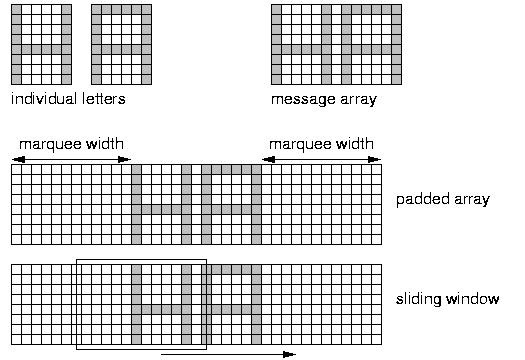
You can follow any approach (algorithm) you understand is best in implementing the MarqueeDataManager class. The approach that we used in our implementation is based on a "sliding window" principle. Here is a general outline of the approach, and a figure is provided below to illustrate it.
Setting up the padded array:
The sliding window and step():
Once you have created the padded array, each call to step() returns a 2-dimensional subarray of this array called the "window". Each window is exactly the same in size as the marquee. The window starts at the left end of the padded array and each call to step() causes it to slide one column to the right. Copy the contents to a 2-dimensional array, which is then returned as the result of step().
Requirements
Here is an example that show a couple of snapshots of the marquee as it displays the message "FEAR THE TURTLE". By the way in order to stop the marquee just close the display window.
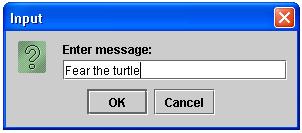
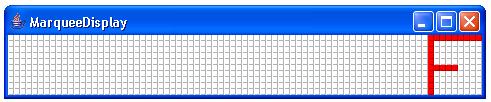
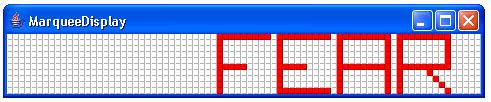
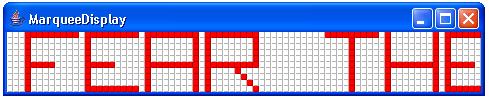
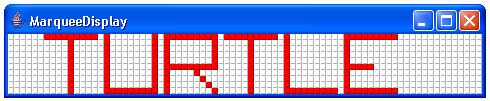
To provide you with additional confidence that your program works correctly, we have provided a special class for testing purposes, called MarqueeTests. Executing the main method of the class MarqueeTests will allow you to test some of the functionality expected from the MarqueeDataManager class. The results for each test can be found in the files Test1ResultsMarquee.txt and Test2ResultsMarquee.txt.
Incidentally, these are the tests you will find in the submit server. Make sure that after submitting your program you verify your program pass the submit server tests.
Remember that you are not required to implement the following problem. Please visit the course web page for information regarding challenge problems. IMPORTANT: If you decide to complete the challenge problem you must provide its implementation in the file called Challenge.java.
For this challenge problem, implement one of the following three options. If you want to implement them all that is fine, however we can only grade one. Make sure that you provide a main method in the Challenge class that allow us to run your challenge problem. The main method is identical to the main method of the Marquee.java class, except that the animationPattern number must correspond to the challenge problem choice you want us to look at.
Choice 1 (1 Gold Star)
The message will start moving in the opposite direction once it has been completely displayed (e.g., it has disappear).
Choice 2 (2 Gold Stars)
The message moves to the left, hits the left boundary, and starts moving towards the right. Once the message disappears, the process will start all over again. You can assume the message completely fits on the display.
Choice 3 (3 Gold Stars)
Implements the behavior of Choice 2 and in addition, the message "blinks" as it moves.
Submission
Submit your project using the submit project option associated with Eclipse. Remember to complete your time log before submitting your homework.