| Project #2 |
CMSC 389C |
| Due: Sunday 1/22 at 11:00PM |
C++ Programming |
Tic-Tac-Toe Virtuoso
"The Only Winning Move is Not to Play"

Objective
To practice many of the features of C++ including classes with dynamically allocated members, making use of the Standard
Template Library, etc. Hopefully you'll use most of the features and concepts that we've gone over in class.
Overview
As you surely know, Tic-Tac-Toe is an amazingly interesting and difficult game. OK, not really. Just in
case you somehow made it into college without learning how to play, you can read all about the game by clicking this link..
Our project will involve two phases and then an optional "extra credit phase":
- Write a class called BoardState that represents the state of the board at a particular moment during the game. Please
note that we are not assuming the board is 3 by 3. Our board could be 2 by 2 or any larger (square) size.
- Write a class called CompleteStateGraph that literally contains the entire state graph for every possible
game. This will be a directed graph. Each node in the graph will contain a board-state and a vector of pointers
to other nodes. Important: Our graph will never contain two nodes with the same BoardState!
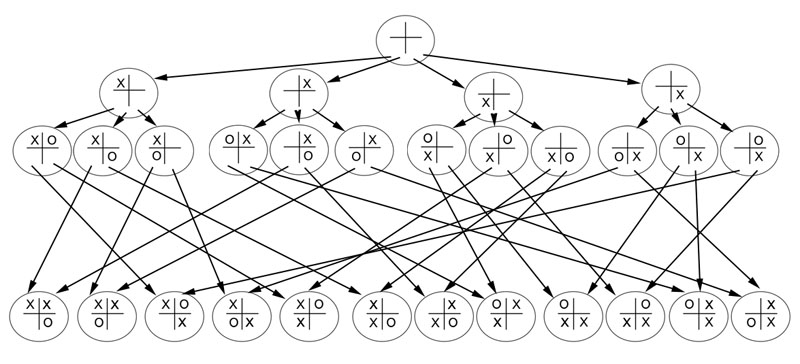
Below is a diagram of the CompleteStateGraph for all possible games played on a 2 by 2 board:
- OPTIONAL EXTRA CREDIT: Write a class called PrunedStateGraph that represents the state graph but without any paths that result in a win for player
'X'. Note that for the 2 by 2 game, this results in an empty graph, since every possible game results in a win for player 'X'!
However on a larger board there are many scenarios where 'X' does not win, and so we will construct a graph that depicts all
of them.
Getting the Project Files
Go into your personal directory, and from the command prompt, type:
cp -r ../../public/P2 .
(Notice the "space dot" at the end. Also, don't forget to use the -r option.)
That should give you the necessary files in a directory called P2
Part I: BoardState Class
A BoardState object represents the state of the tic-tac-toe board at any one particular moment.
Each position on the board can either be blank, contain an 'X', or contain an 'O'. The
BoardState is also responsible for remembering whose turn it is.
The board can be a square of any size: 2 by 2, 3 by 3, 4 by 4, 100 by 100. You'll need to
allocate your data members dynamically.
Note that the BoardState does not know anything about the rules of the game, so it would
be perfectly happy if all of the board positions had X's in them or some other absurd
configuration. Important: The BoardState is not a Node. We have a separate Node
class that will be used to wrap a BoardState when we construct the graphs.
The BoardState does not keep pointers
to other BoardStates, it just stores the configuration of the current board.
We have included a header file (BoardState.h)
that is mostly filled in. What you need to do is to fill in the private data members
that you will use to store the state of a board. You are free to store your data any way
you choose, but you are only allowed to use primitives or pointers (or pointers to pointers).
The Board should keep track of where the X's and O's are,
and should also keep track of whose turn it is. That's all.
After deciding how you will store the data for the BoardState, you will write the implementation file,
BoardState.cpp
Restrictions on the BoardState class:
- You may not #include anything anywhere, other than #including BoardState.h in BoardState.cpp.
This rule applies to both BoardState.h
and BoardState.cpp. Absolutely no #includes other than #include BoardState.h
- You may only use primitive types or pointers (or pointers to pointers) in the implementation
of the class. Arrays are fine, but no strings, no vectors, no maps, nothing like that at all.
- You may not add any public members to the class, and you may not modify any of the
function declarations that are already there.
Here are the specifications for the functions you must implement in BoardState.cpp:
- BoardState(unsigned int) -- Initialize an empty board of the given size.
For example, if the parameter is 3, then you must construct an empty 3 by 3 board.
You may assume that the size parameter will always be at least 2.
The BoardState also keeps track of whose turn it is. Player 'X' always goes first,
so have the BoardState remember that player 'X' has the next move.
- BoardState(BoardState const &) -- Copy constructor. Be sure to make a deep
copy. Don't forget to copy the board and also the variable that is keeping track of whose
turn it is.
- BoardState & operator=(BoardState const &) -- Overload the assignment operator
following the example from class. Be sure to do the "self-assignment" check,
and don't forget that you must first de-allocate the current data before
copying over the new data.
- bool operator==(BoardState const &) const -- To be considered equal, two
Boardstates must be the same size, and have X's and O's in all the same
locations, and it should be the same player who is about to move.
(Whose move is next is not implicit in the symbols on the board -- the
boardstate does not have to be consistent with the rules of tic-tac-toe.)
- bool operator<(BoardState const &) const -- It is very important that this function
is written correctly! Several of the release tests will use your BoardState objects as
keys for maps -- of course maps only work for keys with a proper operator< function.
I don't care how you define it, but you
must ensure that:
- For every pair of distinct BoardStates, x and y: Either x < y or y < x
and not both!
- Also it must be transitive: If x < y and y < z then x < z.
- Finally, no BoardState can be considered less than itself.
I suggest using a "lexicographical" ordering (like alphabetical order) where you
pretend each board is like a string. Let's use a hyphen ('-') to represent
an empty location. So, abstractly we can imagine that an empty 2 by 2 board
is like the string "----". A 2 by 2 board with X's on the
top row and O's on the bottom row could be considered "XXOO", while a 2 by 2
board that has X's everywhere except the bottom-left corner, which is blank would
be "XX-X". Please note that since we are not assuming the placement of X's and O's
are in any way connected to "whose turn it is", we should also concatenate to the
string an extra symbol representing the player whose turn is next.
Although you are not allowed to use the string class for this portion
of the project, you can easily write code that views each board as a sequence of
characters and compares them lexicographically (in alphabetical order). That would
be a good implementation of operator<. Do it however you want, just be sure to
satisfy the three conditions listed above.
- bool isFullBoard() const -- Returns true if all of the locations on the
board contain either an X or an O; returns false if there is at least one unused
location.
- bool hasWon(char) const -- The parameter will either be 'X' or 'O'. Checks
to see whether or not the specified player has won the game. To win the game,
there must be a row, column, or diagonal that is comprised entirely of the
specified character. (e.g. On a 4 by 4 board, there have to be four of the
specified character in a row, either horizontally, vertically, or diagonally.)
The function returns true if the specified player has won, false otherwise.
- void set(int row, int col, char) -- The third argument will either be 'X' or
'O'. Places the specified character at the specified location on the board. You
may assume that the row and column are in the proper range.
IMPORTANT: Do not toggle whose turn it is when this function is called.
The BoardState does not know that a game is being played, so there is no
connection between the symbols on the board and whose turn is next.
- char get(int row, int col) const -- Returns one of three things: 'X', 'O',
or a hyphen ('-') depending on whether the specified location contains an 'X', an
'O', or nothing.
- char getWhoseTurn() const -- Returns either 'X' or 'O', depending on who is
about to move. The basic constructor should set it so 'X' goes first.
The player whose turn it is will only be changed when the framework
calls the "toggleTurn" function, detailed below.
- void toggleTurn() -- If it is X's turn, changes it to O's turn and vice versa.
- unsigned int getSize() const -- Returns the size of the board. (E.g. for a 3 by 3
board, would return 3.)
- ~BoardState() -- Destructor. You know what to do! Free up any memory that this
BoardState allocated.
Part II: CompleteStateGraph Class
The CompleteStateGraph is a directed graph that depicts the flow of every possible game
of tic-tac-toe for a given board size. The graph pictured above is the complete state graph
for 2 by 2 tic-tac-toe.
We have provided the header file CompleteStateGraph.h. Do not modify it in any way!
Your job will be to write the implementation file, CompleteStateGraph.cpp.
Before you get started on the Graph, you should know that we already wrote a Node class for you!
Please take a look at the files Node.h and Node.cpp. They are finished -- don't change them.
A Node consists of a BoardState together with a vector of pointers to other Nodes. Sounds like a
directed graph, doesn't it!? Look at the picture above that shows the CompleteStateGraph for
size 2 by 2. Each of the ellipses represents a Node.
Note that the CompleteStateGraph has a the following private member:
Node const *start;
As you might guess, this will be a pointer to the Node that holds the empty board representing
the beginning of the game.
Here are the specifications for the functions you must write in the CompleteStateGraph class:
- CompleteStateGraph(int) -- Constructs the complete state graph of the game
tic-tac-toe for the given board size. For example, if the parameter is 2, it should construct
the graph that appears above, and set the variable "start" so that it points
to the Node at the top. Note that the terminal nodes (the ones who don't point to anyone else)
must represent the end of
a game. IMPORTANT: The game ends when either player has won, or if the
board has become full. A 2 by 2 game ends quickly because 'X' always wins on his second move.
A 3 by 3 game can go on for 9 moves.
A 4 by 4 game can go on for 16 moves, etc.
Writing this constructor is the difficult part of the
project. You must instantiate all of the nodes, each containing the proper BoardState, and
with a vector of pointers that point to the correct successor nodes.
Right away you will notice that all of the Nodes in the Graph have to be const.
This will annoy you. It is annoying because the constructor for a Node needs you
to pass in a vector of pointers that point to all of it's successors.
Since you can't mutate a Node, that means that you have to
actually construct the successor Nodes before you construct the current Node.
You will need to give this some thought and you will certainly want to do this
recursively.
The other difficulty is that you are not allowed to have more than one Node with any
particular BoardState. Notice in the diagram above that each Node has a different
BoardState. (If we had allowed multiple nodes with the same BoardState, then the structure would have been a Tree,
which would have wasted an enormous amount of memory, but
the project would have been a heck of a lot easier!)
Before you jump in and attempt to write this constructor, give it some thought.
- CompleteStateGraph(CompleteStateGraph const &) -- Copy constructor. Be sure
that your copy is a deep copy. Here's a big hint: For a given size, there is
only ONE CompleteStateGraph diagram. So... my copy constructor merely builds
(from scratch)
another CompleteStateGraph of the same size as the one I'm copying! Cheating?
Maybe! But it builds an exact deep copy of the parameter, so it works perfectly.
You're free to make the copy any way you choose.
- Node const * getStart() const -- Don't hurt your brain on this one, just
type: "return start;" and move on to the next function.
- CompleteStateGraph & operator=(CompleteStateGraph const &) -- As always, the
assignment operator must de-allocate all of the memory being used by the current
object, and then re-initialize it to be a copy of the parameter. The hint I
gave for the copy constructor could also apply to the copy phase of this one!
- ~CompleteStateGraph() -- Destructor. Be sure to wipe out all of the memory
that was allocated for the current graph. It is not at all obvious how to do this
without calling delete more than once on the same node (which will crash horribly!)
Give it some thought.
EFFICIENCY REQUIREMENT
Your implementation must be reasonably efficient. If you are traversing every possible scenario
over and over again, then your code will run too slowly and we will not be able to
test it. If your code times out during any of the release tests, you will receive 0 points
for the test.
Part III: OPTIONAL EXTRA CREDIT: PrunedStateGraph Class
This part is exactly the same as the previous part, but you will be constructing a different
graph. The graph we require for this class
consists of all possible games that do not result in a win for player
'X'. In other words, the terminal nodes for this graph will consist of only boards where player
'O' has won, or boards that are completely full (and 'X' has not won.) Note that for the 2 by 2
game, this is an empty graph, since 'X' always wins.
However for larger sizes there are plenty of paths where either 'O'
wins or nobody wins.
The interesting thing about tic-tac-toe is that constructing this pruned graph will not eliminate
any of the choices that player 'X' has at any juncture! That means that tic-tac-toe is a game
that player 'O' cannot lose. We use this fact together with your completed PrunedStateGraph to
run a little program (driver2) that plays a flawless game of tic-tac-toe. You get to be player 'X'
(so you go first) and
the computer will be player 'O'. The computer will always choose moves that are on the
PrunedStateGraph, so it cannot lose, no matter what moves you choose! Try out driver2
and I'm sure you'll be captivated for hours as your computer humbles you with it's flawless play.
Using the Makefile (Provided)
For this project there are three public tests.
To run one of the public tests, type either "make pub1", "make pub2", or "make pub3".
I also wrote two small programs that might be useful in testing/debugging your code:
- Type "make driver1" to run a program that uses your ComleteStateGraph class. It will play games
of tic-tac-toe where each move is selected randomly from the possible moves at that juncture, based
on your graph.
- Type "make driver2" to run a program that uses your PrunedStateGraph class (which only makes
sense if you have implemented the optional extra credit part.) It will let you play
against the computer. You get to go first, so you are player 'X'. Since the computer's moves will be selected
from the pruned version of the graph, the computer cannot lose! It's really very frustrating.
Submitting
- To submit the assignment, make sure you are inside the project directory and then type:
java -jar submit.jar
(Of course you might have to type "tap -q java" first, just like always.)
The first time you submit it will ask you to authenticate -- use your University of Maryland directory
ID and password.
- After you've submitted, go to the Winter submit server to
see your submission. You'll need to spend a token to see how you did on the release tests.
Grading
This assignment is worth 100 points. If you successfully complete the extra credit portion, you could earn as much as 15 extra points (so your grade could be as high as 115/100). Here is how the tests break down:
Public tests:
- pub1: 25 points
- pub2: 15 points
- pub3: 10 points
Release tests:
- 4 release tests for the CompletedStateGraph: 50 points total
- 2 release tests that are considered EXTRA CREDIT. These will test your PrunedStateGraph: 15 points total
Web Accessibility