|
Report on Development Process
Section I. Low Fidelity Prototype
Section II. Development Process
Section III. Usability Tests and Analysis of Results
Section IV. Questionnaires
I. Low Fidelity Prototype
Introduction
Our original low-fidelity prototypes were laid out in Visual Studio
although we knew that we were not using visual studio for development.
We chose to do this because Visual studio has a wider selection
of widgets available in their visual editor and also requires little
to no coding to be done for the form to be compiled whereas SWT
requires much more coding to be done.
Included are sample screens from the prototypes developed by David
and Stephen. The ideas from these two prototypes made up much of
the design of the final prototype.
Prototype Main Screen
This was the Main screen of Stephen’s prototype. We adapted
our overall layout from this form, utilizing the vertical navigation
bar on the side to move between functions. Also the Calendar layout
seen here is similar to the one used in the final project.
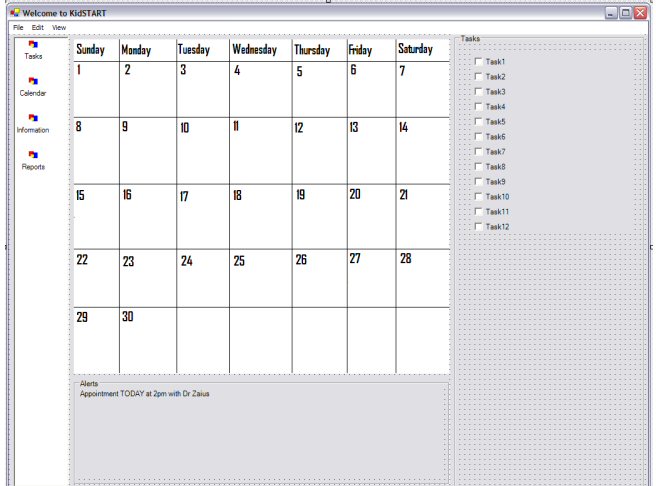
Figure 1: Prototype Main Screen
Prototype Task Screen
This screen was developed by David and ultimately ended up being
the main screen for our final prototype. We particularly liked this
design because if the tasks were minimized it allowed you to view
a large number of tasks at once. If you expanded a task however
it gave you detailed information on the task as well as the ability
to leave feedback about it. We felt that this gave the form a lot
of functionality and meant that the user didn’t have to familiarize
themselves with as many forms.
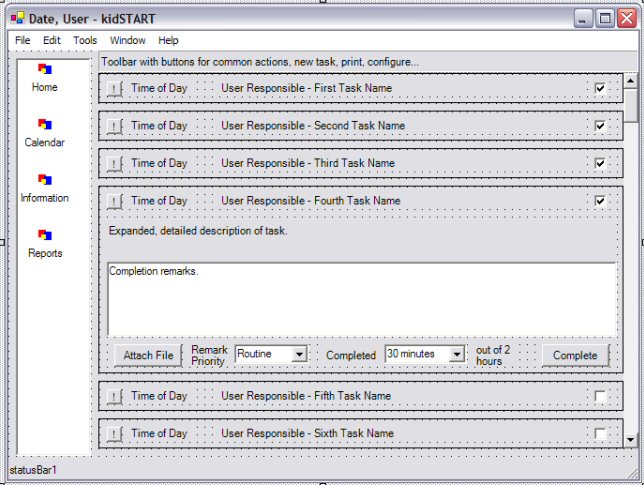
Figure 2: Prototype task screen
Prototype New Task Screen
This form which was developed by David ended up being almost identical
in the final prototype. It is a simple easy to follow form that
is clean and gets all of the needed information.
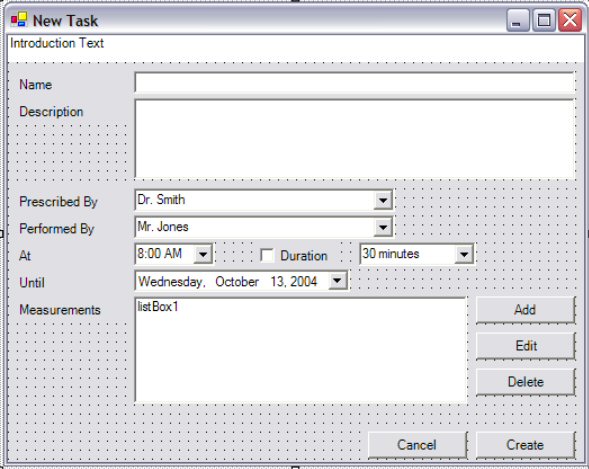
Figure 3: Prototype new task screen
Prototype Information page
This page was part of Steve’s low Fidelity prototype. We really
liked the idea and the layout of this form but we decided that it
was a lower priority item on the final prototype since it was a
more of a convenience feature and not something that couldn’t
be done in another program with little difficulty. Also we were
not entirely sure what type of information to include on the pages
and how we should break that information down. Therefore although
there is a space for it and plans for this function it wasn’t
implemented in the final prototype.

Figure 4: Prototype information page
Prototype Daily Summary
This screen was originally part of David’s prototype and was
included in the final design because it was clean and accomplished
the purpose with very little extra information.

Figure 5: Prototype daily summary
Back To Top
II. Development Process
Our initial idea was to develop a software package to aid in the
caretaking of autistic children. Our first task was to decide who
would be the primary user of the software. We decided that we wanted
to focus on the parents of autistic children. Although we wanted
to focus on the parents of Autistic children we wanted to make sure
the software would be useful to the other people that would be in
the home taking care of the child. This category of people was mainly
made up of home-therapists and clinicians.
The first step in developing our project was to determine the major
needs of the caretakers of Autistic children. In order to determine
what these needs were we interviewed several people who have experience
interacting with autistic children in several different capacities
including, parents, teachers, clinicians, and therapists. This gave
us several different viewpoints on the subject which allowed us
to make an informed decision about what features to focus on in
our software. The most beneficial person we talked to was the parent
of a child whose son was recently diagnosed with autism. One of
the greatest challenges she told us about was the challenge of keeping
meaningful records about her son’s performance of tasks. She
had developed a form she was using in excel however it was still
difficult to keep this things organized and to enter data. Also
it was impossible to visualize the data over spans of time because
the data is all stored separately. We decided that this would be
one of the major focuses of our project: data collection and visualization.
The major needs we discovered were:
- Daily Task organization
- Information recording and reporting and visualization
- Communication between parents, physicians, therapists and clinicians
- Recording milestones
Once we knew the major needs we had to determine which of them
could be best met by our software program. Our major concerns in
regard to what features to focus on were importance and feasibility.
We wanted to try to use our time efficiently and find a medium between
implementing the most useful tasks and as many tasks as we could.
In order to do that we had to decide which were most important and
we also had to try to estimate how difficult it would be to implement
each of the tasks.
The set of tasks we finally decided to attempt to implement were:
- Daily Tasks
- Adding and removing tasks
- Marking tasks as completed
- Recording observations about tasks
- Calendar
- Adding and removing appointments
- Viewing appointments
- Being able to set recurrences for appointments
- Information
- Keeping emergency information for the child
- Storing contact information for everyone who works with the
child
- Store Behavioral protocols
- Store Dietary Restrictions
- Visualizations
- Develop a meaningful way to search a large amount of data over
a period of time
- Allow for searching and filtering data
After we decided on the list of tasks and features we wanted to
include we had to decide upon a layout. In order to brainstorm as
many different ideas as possible about how to design the interface
for our project we made several different prototypes. David and
Steve each designed our own while Lauren and Dyami worked together
to develop a third prototype. The three prototypes that were developed
ended up being rather similar but we decided to use a combination
of the prototypes that David and Steve developed. One of the features
of David’s design that we liked the most was the Daily Task
Screen. We decided that this should be the focal point of the project
as well as the main screen because one of the main focuses of our
software was organization and management of the daily tasks.
After deciding on our layout we went to work implementing the design.
We chose to use Java with SWT, the Standard Widget Toolkit. We also
chose to do our development using Eclipse, a free java IDE that
has many useful tools for using SWT. One of the main reasons we
chose this was that David was familiar with SWT and knew how to
implement several of the features in SWT that we did not know how
to implement in Visual Studio. These two features were browser integration
in order to imbed flash into our project which we used for our data
visualization as well as the help. We also planned to implement
the calendar using flash and imbedding it with a browser. The other
function that we didn’t know how to implement in Visual Studio
was the drop down menus that we use in the task display.
David and Steve worked on the Interface Design while Lauren and
Dyami worked on the data visualization in flash. We decided to focus
on implementing working and testable versions of several of the
functions instead of completely finishing the functions. We decided
to ignore the need for long term data storage and use prefabricated
datasets read from text files in order to show the feasibility of
our features and ideas.
Back To Top
III. Usability Tests and Analysis
of Results
Introduction
We conducted a total of 5 usability tests with a variety
of subjects in order to see how it would be received by the different
types of people that could be using the features of this software.
We test 2 parents of an autistic child, which is our primary user
group, 2 therapists who conduct home therapy with autistic children,
and 1 Speech pathologist that conducts office based therapy with
autistic children. We were hoping to find out different information
from the 3 different sets of users. From the parents we were hoping
to determine the overall ease of use as well as the interest level
in the specific features we have implemented as well as what other
features would be useful on a day to day basis. We were hoping to
determine from the home therapists if our software would enable
them to communicate better with the other therapists. From the Speech
Pathologists we were hoping to find if they felt the communication
aspects would allow them to make decisions more effectively and
also if they would recommend this kind of software to their clients
as a way to organize and track treatment.
Reports
Subject 1:
Subject 1 is a 40 year old mother of three young children ages one
to three. Her two eldest children, two and three, have been diagnosed
with minor development delays while her one year old son Ben has
been diagnosed with Autism. The subject has on average two therapists
coming everyday to work with Ben which she balances with a career
in Real Estate.
The subject was an experienced computer user and quickly became
familiarized with the interface. She easily completed the tasks
with little problem, though she did have several suggestions for
improvement.
- Fix the lack of a help function.
- The ability to print monthly calendar.
- Have the ability to print or email the data as a single option
Overall the subject was very pleased with the idea and the ability
to keep everything organized in one place because she has been trying
to develop her own system to keep track of progress and a record of
her son’s improvement.
Subject 2:
Subject 2 is a 45 year old father of three young children ages one
to three. His two eldest children, two and three, have been diagnosed
with minor development delays while his one year old son Ben has been
diagnosed with Autism. The subject has on average two therapists coming
everyday to work with Ben which with they balance with a full time
career. The subject was an experienced computer user and quickly
became familiarized with the interface. While overly satisfied with
the product he did have several suggestions for improvement.
- Fix the lack of a help function.
- Ability to automate the sending of data on a daily/weekly basis.
Subject 3:
Subject 3 was a 23 year old graduate student in speech pathology.
She currently works conducting home therapy for a young autistic
child twice a week.
The function of the software that most excited the subject was
the communications aspect with email and print outs as well as the
ability to set who assigned a specific task. The biggest problem
that she faces in home therapy is that she doesn’t always
no what the other therapists are working on with the child or if
anything has proven to be particularly effective. They felt that
the communications would enable them to be much more effective with
their therapy.
Suggestions for improvement
- Lack of help
- Add ability to search data/tasks by therapist/goal/and time.
- Include a Goal section in the description of the task
Subject 4:
Subject 4 was a 23 year old graduate student in speech pathology.
She current works conducting home therapy for two young autistic
children several times a week.
As with the other therapist the idea of facilitating communication
between therapists was an exciting prospect. Communication between
several people who work with the child when none of them are there
at the same time is very difficult and a centralized system would
make things much simpler.
Suggestions for improvement:
- lack of help
- Encoding daily reports as good/bad days and then visualize that
on the timeline by color coding.
- Ability to view calendar and get both all appointments and tasks
for a day by viewing info for that day.
Subject 5:
Subject 5 is a 25 year old Speech Pathologist that works at Kennedy
Krieger Institute in their school for autistic children conducting
one on one speech therapy in a school/office setting. She sees her
patients once a week.
The therapist was interested in the Daily reports and the abilities
to email them because they often find it difficult to obtain that
kind of daily information in an organized fashion from the parents.
They also feel it would be something that they would recommend as
a way of organize and tracking all of the therapies and other things
that their children is involved with.
Suggestions for improvement:
- lack of help
- Ability to have a set task list for each day of the week (especially
useful for older children who are in school)
- Ability to print daily task list.
- Ability to search history by task/keyword/time/therapist
- Create a wizard to walk the user through setting up all the
needed elements the first time they use it.
Summary of tests
None of the subjects had any problems carrying out the assigned
tasks. Most claimed that the simple interface made it very easy
to use and to find things because there were not a large number
of menus to have to look through to find functions. I would say
that the major thing we got out of the testing was what directions
we can take the project in. None of us have first hand experience
in caring for autistic children so lack first hand experience. The
tests gave us a lot of ideas of useful features that we could add
to the project. One of the major pieces of information we gathered
was a list of things we could include in the info section that could
be useful. We liked the idea of having it but having no medical
experience we were not sure what things we should include. However
from talking to all our subjects we have determined that we should
include emergency contact, and dietary information, behavioral protocols,
development levels, and contact information for all doctors and
therapists.
Evaluation of Problems and Suggestions
| Problem/suggestion |
Importance |
Effort |
| Fix the lack of a help function |
5 |
2 |
| print monthly calendar |
3 |
2 |
| ability to print or email the data as a single option |
4 |
1 |
| Ability to have a set task list for each day of the week |
3 |
3 |
| Ability to print daily task list |
4 |
2 |
| Ability to search history by task/keyword/time/therapist |
4 |
4 |
| wizard to walk the user through setting |
5 |
4 |
| Encoding daily reports as good/bad days |
2 |
3 |
| view calendar and get both all appointments and tasks |
2 |
3 |
| Add ability to search data/tasks by therapist/goal/and time |
4 |
4 |
| Include a Goal section in the description of the task |
4 |
1 |
Conclusion
Overall the usability tests were very informative. We have gained
a lot of information and many suggestions for ways in which we can
expand upon the functionality of KidSTART to make it more functional
to our targetaudience.
Back To Top
IV. Questionnaires
KidSTART Pre-Test Questionnaire
General Questions:
1) Age Range: ? under 18 ? 18-25 ? 26-40 ? 41-60 ? 61 and over
2) Do you have a Personal Computer (PC) in your household?
Yes / No
3) If yes, how often do you use the computer?
1 2 3 4 5 6 7
Never Daily
Autism Related Questions:
4) Are you responsible for taking care of an autistic child?
Yes / No
5) Are you familiar with the DIR/Floortime treatment model for
children with autistic spectrum disorders?
Yes / No
6) Have you ever used a scheduling tool to keep track of daily
appointments and tasks?
Yes / No
7) Would you consider using a scheduling tool on a computer to
keep track of daily appointments and tasks?
Yes / No
8) Do you think having a scheduling tool on the computer would
be helpful in tracking daily appointments and tasks for an autistic
child?
Yes / No
KidSTART Post-Test Questionnaire
1) I liked using this application
1 2 3 4 5 6 7 8
Strongly Disagree Neutral Strongly Agree
2) Would this software be useful in monitoring the caretaking of
your Autistic child?
1 2 3 4 5 6 7 8
Extremely Difficult Neutral Extremely Easy
3) Ease of entering in a new task
1 2 3 4 5 6 7 8
Extremely Difficult Neutral Extremely Easy
4) Ease of entering in a new observation
1 2 3 4 5 6 7 8
Extremely Difficult Neutral Extremely Easy
5) Ease of viewing daily tasks
1 2 3 4 5 6 7 8
Extremely Difficult Neutral Extremely Easy
6) Ease of viewing weekly/monthly appointments
1 2 3 4 5 6 7 8
Extremely Difficult Neutral Extremely Easy
7) Ease of compiling/printing monthly observations summary
1 2 3 4 5 6 7 8
Extremely Difficult Neutral Extremely Easy
8) What would make the application easier to use?
9) What problems occurred during usage?
10) What features did you like or dislike about this application?
11) Please list any additional comments.
Back To Top
|


