| Home |
| Syllabus |
| Schedule |
| Projects |
| Tests |
| Resources |
| Piazza |
| Submit Server |
| Grades Server |
CMSC 330, Spring 2015
Organization of Programming Languages
Project 6 - Maze Solver in Prolog
Introduction
For this project you will need to implement a number of functions in Prolog that together can be used to find solutions for mazes. This project will provide experience dealing with logic, recursion, lists, and other features in Prolog.
Extra credit opportunity: Implement a SAT solver
Getting Started
Download the following archive file p6.zip and extract its contents.Along with files used to make direct submissions to the submit server (submit.jar, .submit, submit.rb), you will find the following project files:
- Your Prolog program - logic.pl
- Public tests
- Expected outputs for public tests
- Public test driver - goTest.pl
- Maze Converter - convertMaze.rb
The logic.pl file you downloaded contains a number of utility functions, and comments describing the functions you are required to implement.
Note that you must implement your functions with the exact parameters specified, or else the submit server tests will fail.
Running Public Tests
The public tests are set up as a number of Prolog programs that will call functions from your logic.pl code and test them with different inputs. To execute a public test, you need to load both logic.pl and the public test file into the Prolog interpreter, then call the appropriate public test function for each logic.pl function you were required to implement. The public test functions are:- public_prod
- public_fill
- public_genN
- public_genXY
- public_flat
- public_stats
- public_validPath
- public_findDistance
- public_solve
swipl                                 % start prolog
?- working_directory(C,'path to p6'). % go to p6 directory
                        % start here if using swipl-win.exe
?- ['logic.pl'].                      % load your code
?- ['publicMaze1.pl'].                % load public test
?- maze1_public.                    % run public test
etc...
On Windows machines, opening the logic.pl file with swipl-win.exe
will bring up a window running the Prolog interpreter in the
directory containing logic.pl, so it is not necessary to
start swipl or call the function working_directory manually.
Alternatively, you may run all of the public tests at once using the goTest.pl public test driver provided. It will load logic.pl and all the public tests, then run all public tests at once.
swipl                                 % start prolog
?- working_directory(C,'path to p6'). % go to p6 directory
?- ['goTest.pl'].                     % load test driver
                        % start here if using swipl-win.exe
?- run.                               % run all public tests
Prolog Library Functions Allowed
For this project you should write most code yourself, and only use Prolog's built-in and library functions where absolutely necessary. You are not allowed to use any library or built-in functions unless they are explicitly listed as permitted functions. The only built-in function that you are allowed to use for this project are:
| Type | Built-in Functions |
| Arithmetic | +, -, *, div, mod, <, =<, >, >=, is, =:= |
| Logic | ==, =, \==, \=, \+ |
| Lists | [H|T], [H1,H2|T], [H1,H2,H3|T], etc. |
| List Utilities | member(X,L), append(X,Y,R), sort(X,R) |
| Cut | ! |
| Collecting Solutions | findall(X,Y,R), setof(X,Y,R) |
Since many functions you need to implement are similar to those from previous projects, you may find it useful to examine your previous solutions when writing your solution in Prolog.
Part 1: Recursion
Write the following recursive functions:
| Name | Parameters | Example |
| prod(L,R) |
L=list of ints R=product of elements of L • R=1 if L=[] • L will always be given |
?- prod([1,2,3],R). R=6. ?- prod([],R). R=1. |
| fill(N,X,R) |
N=int X=int R=list containing N copies of X • R=[] if N=0 • N will always be given • Either X or R will be given |
?- fill(4,2,R). R=[2,2,2,2]. ?- fill(4,X,[2,2,2,2]). X=2. |
| genN(N,R) |
N=non-zero positive int R=int values between 0 and N-1, inclusive, in ascending order • N will always be given |
?- genN(2,R). R=0; R=1. |
| genXY(N,R) |
N=non-zero positive int R=pairs [X,Y], where X & Y are values between 0 and N-1, inclusive, generated in ascending lexicographic order. • N will always be given |
?- genXY(2,R). R=[0,0]; R=[0,1]; R=[1,0]; R=[1,1]. |
| flat(L,R) |
L=list R=elements of L concatenated together, preserving relative order, first placing non-list elements in a list if necessary • R=[] if L=[] • L will always be given • Only removes one level of list, unlike flatten/2 |
?- flat([[1],[2,3]],R). R=[1,2,3]. ?- flat([1,[2,3]],R). R=[1,2,3]. ?- flat([[1,[2]],3],R). R=[1,[2],3]. |
Part 2: Maze solver
Maze descriptions
For this project, the mazes you will compute with will be given as Prolog databases. In particular, you will be given three kinds of facts- maze(N,SX,SY,EX,EY). This fact
indicates that:
- The height and width of the maze is N cells,
- The default starting position is SX,SY, and
- The ending position is EX,EY.
- cell(X,Y,Dirs,Wts). A fact of this form describes
a cell in the maze. In particular, it says that the cell
at position X,Y, has open walls as described by Dirs,
the list of directions. More precisely:
- The list Dirs will contain at most one of each of the atoms u, d, l, and r, which designate openings going up, down, left, or right, respectively.
- Recall from project one that the coordinate system places 0,0 in the upper left corner of the maze.
- The Wts component of the fact indicates the weights granted to paths following the respective direction. That is, each element in Dirs has a corresponding weight in Wts.
- path(N,SX,SY,Dirs). This fact describes a path
named N (a string) through the maze starting at position
SX,SY and following the directions given by Dirs. For
example, the fact
path('path1',0,3,[u,r,u,l,u]) indicates
that there is a path 'path1' that starts at 0,3 and follows the
given directions to end up at position 0,0.
Based on these maze facts, you need to implement the following functions for solving a maze.
| Name | Parameters | Example |
| stats(U,D,L,R) | U,D,L,R=number of cells with openings up, down, left, and right. |
?- stats(U,D,L,R). U = D, D = 8, L = R, R = 7. |
| validPath(N,W) |
N=name of valid path (only goes through openings) W=float value for weight of path (rounded to 4 decimal places) • Return valid paths in same order as in database • Use round4(X,Y) :- T1 is X*10000, T2 is round(T1), Y is T2/10000. • Apply round4() to final float weight, not intermediate sums. |
?- validPath(N,W). N = path1, W = 99.9958; N = path2, W = 103.779. |
| findDistance(L) |
L=list of coordinates of cells at distance D from maze start • Elements of L are in form [D, [[X1,Y2],[X2,Y2],...]] • Values of D range from 0 to D, in ascending order • D=distance of cell furthest from start • Cell coordinates [X,Y] are in lexicographic order |
?- findDistance(L). L = [[0, [[0, 3]]], [1, [[0, 2]]], [2, [[1, 2]]], [3, [[1, 1],[2,2]], ..., [6, [[3, 2]]]. |
| solve | • True if maze is solvable, fails otherwise. |
?- solve. true. |
The maze converter program convertMaze.rb may be used to convert simple maze files from Project 1 into Prolog for use as test cases. Run it as "ruby convertMaze.rb simpleMazeN.in > prologMazeN.pl".
Extra credit: Boolean Formulae & SAT
As extra credit (up to 2 percent), you are invited to implement a function that determines whether a collection of boolean formulae can be solved (satisfied). Boolean formula will be represented using lists of Prolog terms as follows:- t and f represent true & false, respectively.
- [and, X, Y], [or, X, Y], [no, X] represent the and, or, not operations applied to formulas X, Y.
- [every, V, F], [exists, V, F] represent the forall & exists quantifiers applied to variable V in formula F.
- Any other term x (identifier beginning with lower case letter) represents a variable x.
- Instead of associative lists, we will use a list of true variables. Any variables not in the list are considered false.
Based on these definitions for boolean formulae, you need to implement the following functions for determining whether a formula is satisfiable.
| Name | Parameters | Example |
| eval(F,A,R) |
F=formula to be evaluated A=list of true variables (may be empty) R=result (either t or f) • F and A will always be given • Not all variables in A must be free variables in F |
?- eval(x,[x],R). R = t. ?- eval([and,t,x],[x],R). R = t. |
| varsOf(F,R) |
F=formula to be examined R=list of free variables in F (sorted, no duplicates, may be empty) • F will always be given |
?- varsOf(x,R). R = [x]. ?- varsOf([every,x,x],R). R = []. |
| sat(F,R) |
F=formula to be examined R=list of true variables that satisfies (solves) F • R must be sorted, no duplicates, and contain only free variables of F • If multiple values are possible for R, may return them in any order • May not return the same value for R multiple times • Return R=[] if F is true with no true free variables • Fail if F is not satisfiable • F will always be given |
?- sat(t,R). R = []. ?- sat([or,x,y],R). R = [x]; R = [x,y]; R = [y]. ?- sat(f,R). false. |
This is obviously a terse description; if you have further questions (once you have completed the rest of the assignment), as the course staff.
Testing
We have provided some sample tests for you, to help with the extra credit portion. The rest of the testing will only be secret tests. As described above, to execute a public test, you need to load both logic.pl and the public test file into the Prolog interpreter, then call the appropriate public test function for each logic.pl function you were required to implement. The public test functions are:- public_eval
- public_varsOf
- public_sat
Hints
- You should be making good use of the functions you have already defined above. If your solution is not using several of these functions, you are doing too much work!
- Unlike previous projects, you may be able to rely on Prolog's backtracking to find multiple possible solutions through multiple queries.
- The Prolog functions findall will collect all results from a function using backtracking. The function setof will in addition sort the result and remove duplicates. These functions are used in the public tests.
Submission
You can submit your project in two ways:-
Submit your file logic.pl directly to the
submit server
by clicking on the submit link in the column "web submission".
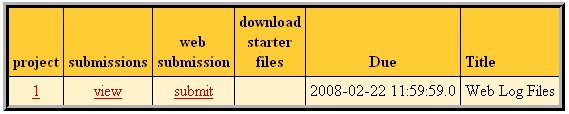
Next, use the submit dialog to submit your logic.pl file.
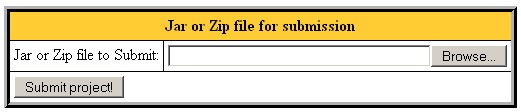
Select your file using the "Browse" button, then press the "Submit project!" button.
-
You may also submit directly by executing a Java program on a computer
with Java and network access. Use the submit.jar file
from the archive p6.zip,
To submit, go to the directory containing your project, then either
execute submit.rb (preferred method) by typing:
ruby submit.rb or use the java jar directly using the following command:
java -jar submit.jar You will be asked to enter your class account and password, then all files in the directory (and its subdirectories) will be put in a jar file and submitted to the submit server. If your submission is successful you will see the message:
Successful submission # received for project 6
Academic Integrity
The Campus Senate has adopted a policy asking students to include the following statement on each assignment in every course: "I pledge on my honor that I have not given or received any unauthorized assistance on this assignment." Consequently your program is requested to contain this pledge in a comment near the top.
Please carefully read the academic honesty section of the course syllabus. Any evidence of impermissible cooperation on projects, use of disallowed materials or resources, or unauthorized use of computer accounts, will be submitted to the Student Honor Council, which could result in an XF for the course, or suspension or expulsion from the University. Be sure you understand what you are and what you are not permitted to do in regards to academic integrity when it comes to project assignments. These policies apply to all students, and the Student Honor Council does not consider lack of knowledge of the policies to be a defense for violating them. Full information is found in the course syllabus---please review it at this time.