
|
Announcements |
08/13/07 Grades have now been officially submitted to the University. Enjoy the rest of the summer!
08/11/07 Your grades in the course have been determined, and you should be able to see what grade you received by going to the grades server. Unfortunately, something is wrong with the University's grade submission process, so I haven't been able to submit your grades officially yet. I've sent a note over to the system administrators, so hopefully I will be able to post your grades officially on Monday.
08/08/07 Since there was a technical problem with the presentation of the "Searching" exercise from Tuesday's lab, I've posted my solution to the problem on your CVS repositories -- I called it "Summer07SearchingExample". Look it over and let me know if you have questions.
08/03/07 Project #8 has been posted. Note that this project is OPEN.
08/01/07 Some people are having trouble connecting to CVS -- here is why: If you never changed the original class account password that you were given, you are no longer going to be able to connect to your CVS repository. (The passwords have expired.) You need to change the password right away! To see instructions on changing your password, click here. If you have trouble changing your password, please drop by to see Fawzi or Matt.
07/25/07 Project #7 has been posted.
07/24/07 The due date for project #6 has been extended to Thursday 7/26/07 at 11:00PM.
07/18/07 Project #6 has been posted. This may be the most difficult project this term, so get started on it immediately and work hard on it until you are finished!
07/11/07 Project #5 has been posted. In addition to writing the usual code, you will be required to write a set of JUnit tests. See the project specification for full details. This project will be time-consuming, so you should start it immediately, and work steadily on it until you are finished. If you wait to start it until a day or two before the due date, you are unlikely to get everything finished on time.
07/03/07 Project #4 has been posted!
06/29/07 There is some kind of technical problem with Eclipse connecting to CVS. If you are seeing this problem, please try the following: When asked for your password, enter the password and check the box that says "Save password". If it asks for your password again, press "Cancel". Then exit Eclipse. Start up Eclipse again and everything should work normally. IMPORTANT: If you are working on a public machine, it is important that once you are finished, you go back into your CVS connection dialog box and UNCHECK the box that says "save password". Otherwise anyone can use your account! If you have any questions about this procedure, please ask Fawzi or Matt Mah.
06/25/07 Please don't forget that your first Midterm exam will be on Thursday! Bring pencils with good erasers and be on time!
06/25/07 Project #3 has been posted!
06/18/07 Project #2 has been posted! Have fun...
06/11/07 Project #1 has been posted! You can check out the project files from your CVS repository now. The project description can be found by clicking on "Projects" in the menu to the left. Get started immediately!
06/10/07 The Java examples that have been presented in lectures up to this point have been posted to your CVS repository. Please feel free to "check out" these folders (in the CVS perspective) so that you can then open them in the Java perspective to run them, edit them, do experiments with them, etc. If you have any trouble at all with this, please drop by office hours and Matt or I will help you!
06/06/07 If you have not already, please immediately go through the following steps to make sure your computer at home is ready for work on course projects. If you need help with any of these steps, please drop by office hours right away.
Install Java, Eclipse, and the Eclipse plug-ins on your computer. Please see this link for Eclipse installation instructions.
Go to the grades server to obtain your class account login ID and password.
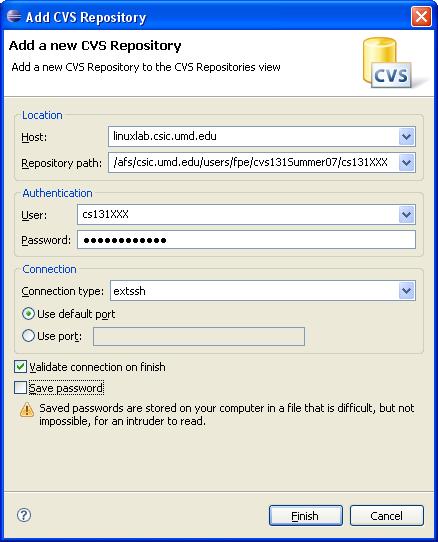
In Eclipse, go into the CVS repository perspective. Create a connection to your CVS repository using your class account. See this screenshot to see how to fill in the various fields of the connection dialog box. Replace cs131XXX with your class account login id (this occurs in two places.) Be sure to use connection type "extssh".
Find the project called "Summer07Lab1" and "check it out" by right-clicking the folder and selecting "check out".
Go into the Java perspective, and you will see the Summer07Lab1 project that you checked out. Right-click the project folder. You should see an option for "submit". Submit the project, and enter your University directory ID and password when prompted to do so.
Login to the submit server to verify that your submission has been received. This is where you will go to see whether or not your projects are passing our tests.
06/02/07 Nelson Padua-Perez will be conducting FREE salsa lessons for anyone who is interested! It's a fun way to learn something new, get some exercise, and meet new people.
Dates: Tue June 5, Thu June 7, Tue June 12, Thu June 14
Where: CSIC 1121
Time: 5pm - 6pm
06/02/07 Be sure to check this page from time to time (I recommend daily) for important course announcements. The more recent messages will appear at the top of the page.